
bob6397

Forum Replies Created
-
AuthorPosts
-
bob6397
ParticipantIt will use different drivers?
I’m not a Serato person but do you need to select the audio output device in settings…?
bob6397
October 6, 2015 at 4:51 pm in reply to: Matching keys, the Camelot wheel and how to alter keys using software? #2267741ParticipantI was thinking of playing a F song after a C song but using the match feature of Djay Pro. That brings F to +5. But that sounds horrible! (the key note and the F sign are now both lit in blue and the match feature say +5).
So I guess that I shouldn’t use this match feature, probably because C and F match already, F being C’s perfect fifth.
But then again, when is that feature useful, could you give me a concrete example?F is C’s Perfect 4th – which sometimes works and sometimes doesn’t. The same key, Perfect 5th and Relative Minor should all work, but it will depend on the chord structure of the song amongst other things. There are no “set in stone” rules here unfortunately..
I have no idea what this “Match” feature is unfortunately so I won’t comment on that..
Also, been thinking about the different storage options you mentioned. I use Time machine and backup my MacBook about once every 10 days.I have a 1T external HD for that. I also found this weekend an old 250 G external HD.
I have 2 iTunes librairies: one is my “general” library and the other is my DJ library. The first one is much bigger. Let’s say I would like to delete all the files from my general iTunes library to make some space on my Macbook, could I just drag the entire “general” library to that 250G HD and then delete the files? I would then have my general library on my backup external HD and in Time machine on the 1 T external HD. Does that makes sense?I don’t think that you can delete all the tracks just by dragging the library file..?
In theory, you could keep all your “General” music on an external drive, and then keep only your DJ music on the HDD of the laptop. For a while, I stored all of my music files on a NAS drive (before I started DJing) and ran iTunes from there so that I could use the same library from different PC’s (Before iTunes Match).. This worked pretty well for what I did with it, and there weren’t any delay’s really despite it all being on the LAN rather than on USB – even when on WiFi..
Hope That Helps,
bob6397
ParticipantWas the mains supply at the club low or different to normal? Other than that, did you have lots of programs open simultaneously (Were you maxing out your CPU?)? What latency settings are you running?
bob6397
ParticipantErm.. None of the above.. Most (on this forum at least) would consider CDJ’s a set back from any controller, especially if you can’t get CDJ2000’s and either a DJM900 or 2000 Nexus mixer.
Apart from the Nexus systems (XDJ1000, CDJ2000), I wouldn’t bother personally buying any CDJ’s. And as the cost of a set like that is going to be at least £3000, I simply wouldn’t bother at all..
Proviso though – If you are really set on getting a pair of CDJ’s – make sure you get ones which A) Take a USB stick. This lets you pre-prep tracks through Recordbox – which is a good thing. All Club CDJ’s will have a USB socket now. (If they don’t, maybe you don’t want to be playing on them and take your controller?) and B) Have a USB socket. This will let you use them as controllers further down the line when you realise the limitations of not using a laptop in the mix…
bob6397
October 4, 2015 at 11:39 pm in reply to: DJ Controller (Replace Numark 4Trak) – Serato VS. Traktor #2266001ParticipantIt came out a couple of days ago didn’t it? http://www.digitaldjtips.com/2015/10/traktor-kontrol-s5-now-available-purchase/
ParticipantDJ Wyld1 – I was simply assuming that if he wanted to use iTunes then recommending FLAC would be a little counter-intuitive…
I am a Windows user and I use iTunes to manage everything – mostly because it syncs with my iPod and it syncs with Virtual DJ without any extra effort..
The way I would import tracks in this situation would be to use Audio grabber (or equivalent) to put them all into a temporary folder. I would then run them through MIK/PN etc. and then import into iTunes, which then stores the files in a decent folder layout. Then delete the originals.. 🙂
bob6397
ParticipantI only ever let people I trust to play through my kit for only that reason.. At one event I help run, we use soft limiters (IE you can’t really hear when they kick in) to protect our sound system.. We then lock that in a rack and none of the DJ’s even know it is there..
Also, my kit is not insured to be used if I am not in the venue.. So no one could ever do this to mine.. In theory 🙂
DJ’s are a pain (speaking as a sound engineer) as they will push it higher and higher as the night goes on – unless they really know what they are doing, which painfully few do – as their ears accustom to the higher sound levels. DJ’s are also nearly always behind the main PA speakers – meaning that it is normally a lot louder for the audience than it is for themselves – and they forget that in the moment. Alcohol also doesn’t help, of course.
I am always concious of the volume levels when I am DJing (I wear earplugs most of the time) and make sure that no one leaves the venue with ringing ears.. Decent speakers help with this of course – Harsh sounding speakers are a lot worse for this.
bob6397
ParticipantQuestions:
-should I let iTunes do all the work of organization my music? If not, what do you recommend. I’m not sure I get the folders organization.I do. iTunes puts all of my music into the format it likes (folders by artist, then album) and it works for me. I organise all my tracks using the metadata and auto-playlists. Meaning that anything I tag also works in Virtual DJ.. It all just sort of works 🙂
-when importing my CDs which format should I choose (file size is not a problem)? Considering the software I’ll be using, that I get my music mostly from CDs and iTunes(AAC 256), sometimes from bandcamp or directly from producers and that I’d prefer not to have too many formats.
As you are on a Mac, I would consider ALAC – which is lossless, smaller file sizes than WAV/AIFF, has metadata, and works on Mac (unlike FLAC, an equivalent format). ALAC files will also sync to Android or IOS if you have any on your phone..
If using downloads from various sources, you can’t help what format they are supplied in. My library is a combination of MP3’s – most of my CD collection was ripped before file sizes weren’t an issue – and AAC files downloaded through iTunes. All are high enough quality to play out but very few are lossless.. Keep it to at least 320Kbps MP3 files or 256Kbps AAC files as a minimum.. Lossless is of course better but you would struggle to hear the difference.
-how do I proceed? Import through iTunes then MIK and Platinum Motes?
I would run the tracks through Platinum Notes, then MIK and then import into iTunes – so you don’t end up with either 2 versions of the same track or unprocessed tracks in your library. I personally don’t use either tool but I am considering getting Platinum Notes..
-the tags (genre, bpm…)before or after MIK and PN?
Either.. It shouldn’t really make a difference – but MIK will alter the tags of some tracks so before might be the better option so you don’t end up changing any of them? If you are using iTunes to do the tags though, I would do it after to save having to import over and over.. Make the system as simple as possible.
-anything else I should do?
Keep it simple. The more complex you make your system, the less likely you are to still be doing it in a few month’s time. Work out a quick, easy solution now and save yourself a headache when you have to re-do tracks down the line because you decide to change the way you do it. If it feels tedious now, you won’t still be doing it later on.
Hope that helps,
bob6397
ParticipantI don’t think they will restrict their own hardware – instead what I think they will do is keep making the “XDJ” line of products for all-in-one controllers (IE They only need music files on a drive to work), keep making the “CDJ” line for old-fashioned people and instead split their “Pro” controller line in 2 – using the “DDJ-S*” models to keep the Serato integration and work heavily on the integration between their “DDJ-R*” models and Recordbox DJ..
They won’t kill off their biggest selling department – they aren’t that stupid..
I don’t think Pioneer intends to take over the market – in fact, they would be frankly a little idiotic to think they could do that quickly at all – but what I think they want to be is the default “One solution for everything” company. They already make equipment which is in almost every DJ booth in the country (Either CDJ2000’s or controllers) and if they combine that with relatively cheap, decent software then they will have the market covered. And anyone who has tried to change from one software to another will know that it takes a lot of work – Once they have you, you’ll be stuck with it and as long as they keep up with the game and develop an identity it should take care of itself. Of course, that no one want’s to change will work against them for now…
Good luck to them.. I haven’t seen anything that would make me change yet though..
bob6397
ParticipantNo problem – any more questions, just ask 🙂
bob6397
ParticipantYes, You can.
All you need for digital DJing is a 4 out (2×2 Stereo Channels) audio interface and a laptop/sound system. The only software which requires certain controllers to make it work is Serato – but most controllers released now support Serato fully anyway.
To reduce latency, make sure you have the most up-to-date drivers installed and make sure you are using the “ASIO” drivers in Traktor for the Kontrol Audio 6.
As I understand it, If you wanted to use a DVS (Digital Vinyl System), then you would need the Traktor card. But as you aren’t, you can use any audio interface you like. I know people who use a Numark DJIO as their soundcard through Traktor and it works absolutely fine 🙂
bob6397
September 30, 2015 at 1:02 am in reply to: Matching keys, the Camelot wheel and how to alter keys using software? #2262821ParticipantFrom what I’ve read, if I put a C song on deck 1, I should choose either a F,G or Am song on deck 2 to improve my odds of mixing 2 songs that are harmonically compatible.
Is that generally correct ?Yes. You can also mix a song to another song in the same key of course 🙂
And if I match deck 2 to deck 1 (F is now « sounding » like a C, right ?) then I guess that I should consider the song playing on deck 2 as a beeing a C to select the third song in the set ?
Not quite. If you have mixed from a C song to an F song, then you can now fade into the keys relevant to the F song – EG, the relative minor of F is D Minor, the 4th is Bb (B Flat) and the 5th is C.
This chart shows the Relative Minors, Perfect 4th’s and Perfect 5th’s for each key..
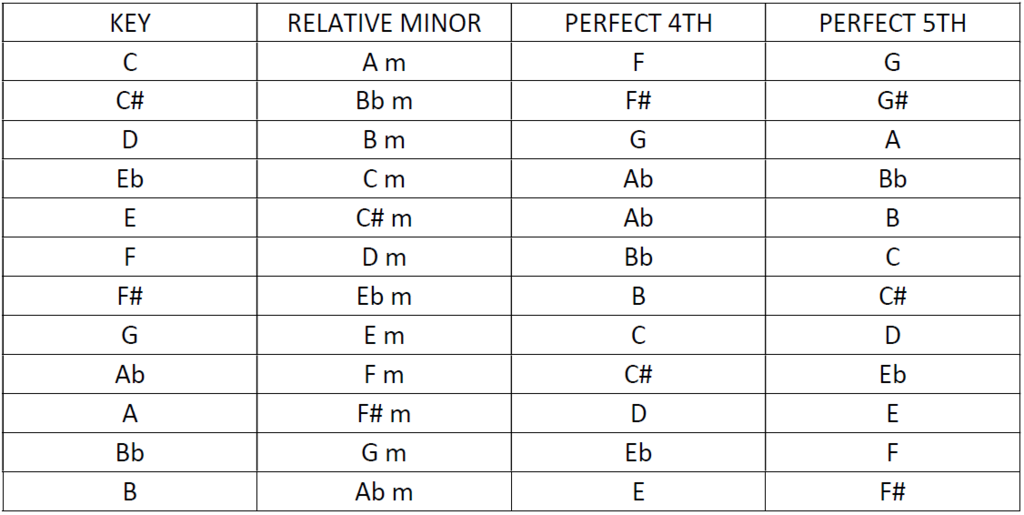
Hopefully that makes sense..
bob6397
ParticipantWell obviously if full brightness isn’t the effect you are after than turn them down a bit..
The situations I have used them in, we had them on full brightness the whole time – but we were using them to light up a ceiling in a reasonably sized room and not actually focused on things.. 🙂
Different situations mean different uses of the same kit..
bob6397
ParticipantI have used a couple of these (set to sound to light, but it wasn’t my event, I was only DJing) and they were on full.. Ignore anyone actually on the stage – they are there to be blinded 🙂
I do lighting design for some stage productions and we use about 30 500W Halogen lamps for one 30x20m stage.. No way 2 of those will be too bright.
bob6397
bob6397
ParticipantI play out with almost exclusively 320Kbps MP3’s and 256Kbps AAC files.. The only time I am bothered is when I am remixing a track – which is when you really can tell. If I remix with an MP3, first Logic turns it into an AIFF file so it can use it effectively. Then I bounce it out as a MP3 – which means that a compressed file has been compressed even more.. There isn’t much I can do about it and Logic is smart enough not to ruin the file.. But it isn’t ideal.
No one will be able to tell through any PA system whether you are using 320MP3 or a 1411Kbps WAV file.. I can’t tell apart from when in a decent recording studio situation or on a complete audiophile setup.. Neither of which are applicable to PA systems..
bob6397
-
AuthorPosts