
bob6397

Forum Replies Created
-
AuthorPosts
-
bob6397
ParticipantDeathy – he says “decreased” but also says he changed it from 5 to 20.. so I took that to mean that he increased it 😉
ParticipantI’m afraid I disagree about the 2 levels of line – the 2 exist, yes – but my Focusrite outputs +4 on the balanced jack outs and on the unbalanced RCAs – there is no difference in sound output level when I have checked it..
And I would also disagree on the use of the pads – this just degrades the signal further – why bother sticking it through a Mic pre-amp when you don’t need to, just to then reduce the level again to get it to the same volume it would be at if you just plugged into a stereo jack input..?
I agree on the RCA’s though – I use them to plug soundcard into mixer but I can control all the leads on my table (And I don’t use old-fashioned lighting rigs – DMX + LEDs all the way 😉
And don’t pretty much all CDJ’s (apart from the nexus range) use RCA outs still? And the inputs on all club mixers and the outputs from turntables? I agree though, they aren’t great…
That cleanbox thing looks good though – isn’t it just a twin DI box though? Looks like it…
bob6397
ParticipantNo Problem.. Any further questions, just ask 🙂
ParticipantRead the original post 🙂
He’s already done that… 😉
ParticipantHi Dom,
A few more thoughts:
Do you have the latest drivers installed for your controller/soundcard? Did you install the drivers with the controller/soundcard plugged in? Do you always plug in into the same USB socket?
Your specs sound fine though. And I hope that you have disabled your internet connection if you have uninstalled your antivirus.. Try installing CCleaner and cleaning out the user? I run it on all the users on all my PCs at least once a month and it keeps them nice and fast.
Is it your entire PC that is feeling a bit slow or is it just that Serato is playing up? I’m not a serato expert (I don’t use it myself and never have) but is the sample rate set correctly for your sound card? It may also be worth checking that Windows is not trying to use the soundcard as it’s default audio device – this should not be the case as your soundcard/controller should use ASIO drivers work with serato properly, and windows overrides ASIO drivers if it decides that the controller should be default, as it then likes to use its own drivers for this purpose. To put it simpler, it can cause all sorts of issues if your controller is set to be the default sound output. Not least that windows can then play sounds through your speakers.. Ever got an email half way through a gig? Not cool if your laptop announces thta fact to all your dancers for you, at incredible volume. 🙂
bob6397
ParticipantHave you got anything intensive running in the background? Or anything that could be eating up your system resources?
If the CPU maxes out, it could cause the sort of glitches you are talking about.
What kind of specs (and which OS) does your computer have??
bob6397
ParticipantIf you want to use headphones, you need an interface with 2 stereo or 4 mono (the 2 are identical) outputs – both the Numark and the Focusrite I mentioned have this. You send the main output to channels 1 + 2 and your headphone output to channels 3 + 4 (The 2 channels being left and right).
Balanced outputs are not louder as far as I can work out – they still work at line-level. What you might want to watch out for though is that some controllers/interfaces output XLR connections at Line level, which you can then plug into your mixer into the XLRs – but you shouldn’t do this as XLR inputs on mixers are designed for microphones and they therefore work at a different level to the output, despite being the same connection. Just a thought 🙂
I very much doubt you will get any interference on the short cable runs you will be using – there is no advantage from this until your cable run is longer than 3m really – and even then it is negligible.. 🙂
If you buy an interface now, and then buy a controller later you can of course use both in the same setup. However, if your controller had an interface built in there would be no point in using the external one as it would be another bit of kit for no apparent gain. But yes, it is possible to use a controller which has an interface (or one which doesn’t) to just control your software and still route all the audio out of the audio interface 🙂
bob6397
ParticipantFirst of all, welcome 🙂
A quick summary of balanced vs unbalanced:
The main advantage of balanced are that it reduces interference (As it uses hot, cold and earth) – but this is only really noticeable over long cable runs or in areas with a lot of electric fields.. The other advantage can be that XLR connections (on cables) are generally longer lasting than RCA connections – but that is a by product not a direct result of them being balanced. The cable runs from your mixer to speakers or mixer to amps should be balanced though.
Balanced connections can be either XLR (the 3 Pole Mic-type sockets) or TRS (3 Pole Jack 1/4 inch Cables)
Unbalanced are usually TS (2 Pole Jack 1/4 inch cables) or RCA cables – and occasionally 3.5mm – headphone ports).In your situation, where you are just going from your Macbook/controller to the mixer I wouldnt bother with balanced – what I would invest in is a better sound card (aka an audio interface) that can output much higher volume levels than the headphone port on your Mac. It will also be much higher quality than the headphone port on your Mac
These can come built in to many controllers – indeed any controller that has a sound output will have an audio interface built in. If you don’t fancy or don’t need a controller for the DJing you are doing, jusy buying an external interface will be cheaper and much more space efficient. I personally don’t use a controller – I use a Focusrite 2i4 – which is a high end card with functions that you probably won’t need. An alternative could be the Numark DJ-IO. The people I know that use this are very pleased with it.
This should give you a better quality and louder sound output, but it may also be worth checking the settings in DJAY to make sure that the software is outputting at a high volume level, as well as the obvious – turn up the volume on your Mac’s main output.
Hope this makes sense,
bob6397
ParticipantOkay. I’m going to assume that’s USD as a unit of currency.. On that budget I would be looking at a pair of half decent active PA speakers – maybe used if you can find a good deal. Active speakers have the amps built in and then require mains power and the audio signal separately.
For that number of people, you should be looking for at least 1000W RMS (That’s continuous power from the speaker – most manufacturers quote peak power but RMS is the number that actually matters) in total.. In terms of input I would get a small PA mixer for the job – one with enough channels to fulfil your needs. This will then have the correct outputs and proper volume controls for the speakers..
When choosing speakers/mixers it is best to go with a known brand – so lower end Mackie/Yamaha kit might do the trick. Other manufacturers are available though 🙂
Hope this makes sense,
bob6397
ParticipantI don’t think Martin will appreciate you sticking them in the same bin as American Audio and Chauvet
Ha ha – maybe you’re right. Although at the low end, brands don’t matter as such – many of the products are exactly the same with different logos on anyway 🙂
You are right about Martin though – their kit is way beyond anything that the budget end produces. They are however much more expensive as a result.. Their kit does work though – and my experiences of MAC 350s have always been positive 🙂
bob6397
ParticipantA couple of questions – what is tailgateing? what is your budget for these speakers? How many people need to hear them? And are you inside or outside?
When I/we know that we will be able to offer some more meaningful advice 🙂
bob6397
ParticipantI would add that I usually run my amps at 0dB – IE 12 o’clock.. My method is get the gain set (as said above) and then put everything to output at 0dB with the amps set to -infinity (no sound coming out). I then fade up the amps to the max level I will want for the evening.
This stops having ultra sensitive speakers (where you turn the master vol up/down small amounts but the resultant change in volume is massive, and it stops you from overdriving the speakers/amp later in the evening as your ears fatigue amd you keep turning the volume up to “add some energy” 🙂
A fail safe for yourself in many ways..
Just my opinion of course – everyone has their own way of doing this.
bob6397
ParticipantLOts of lights. any will do – as long as they are LED and flash to the music. beyond that, there isnt much..
Some moonflower lights can be really effective as well.. brands dont really matter if im honest – though notable ones are chauvet, american audio, martin (way out of your price range btw).. they will all work
ParticipantSo when you say nothing works.. what does that mean exactly?
I can’t comment on Serato as I don’t (and have never) used it with an approved sound card. So, Virtual DJ (On Windows):
First of all I would update to Virtual DJ 8 – this should be free with your current Virtual DJ license as all upgrades are free if you have bought the full license.
The reason I say this is that the mixtrack quad was released after they stopped developing virtual DJ 7 (this was roughly 2 years before V8 was released last july), and there is therefore no built in support for it.
Then download (and install) the mapping from the numark website (http://www.numark.com/product/mixtrack-quad), look on the right hand side as below:
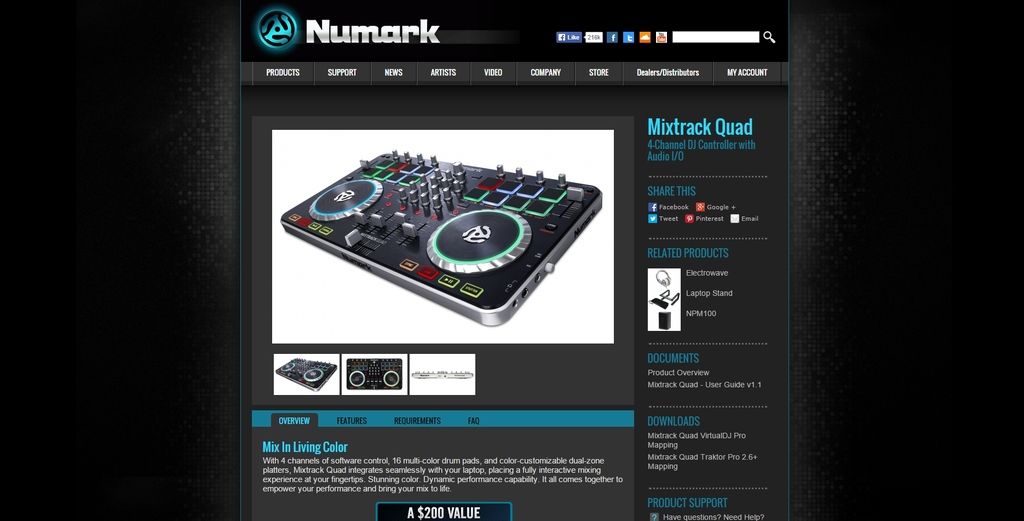
Once you have done that, make sure that all the settings are how you want them in VDJ (IE correctly set up for the way you DJ and the system you use).
Then make sure that the audio output is set correctly, and check that the correct controller mapping is being used.
Then it should all be working..
bob6397
PS: A good tip is to always plug everything into the same USB port – don’t keep swapping which port you plug it into. This is less of an issue on a mac but because of the way that Windows controls devices, it will treat an old device in a new USB port as an entirely new device and try to install drivers for it each time – not heplful. 🙂
ParticipantA couple of T-bars for your lights/a lighting bar? Lights work so much better when they are elevated 🙂
Other than that, you are almost there… Just remember that it doesn’t matter how good the lights you own are, if people cant see what they are doing, they are as good as useless 🙂
For example, this is my regular (weekly) venue for the DJing I do – I used 6 PAR 56 LED Cans to light this (Apologies for the huge mackies in the way… 🙂 )

-
AuthorPosts