
bob6397

Forum Replies Created
-
AuthorPosts
-
bob6397
ParticipantYou should be absolutely fine – you have a full Serato license from the Terminal Mix 8 – that install should not care what hardware is plugged in, as long as it is serato compatible hardware 🙂
bob6397
May 10, 2015 at 3:25 pm in reply to: Are there any Producers or Engineers out there who Use Reason? #2191861ParticipantNo problem.. It was bugging me anyway – I hate it when I can’t do something.. 🙁
In the synth, go to Edit -> Reset Synth (or Reset Instrument/Reset something-or-other near the bottom) and then change the oscillators waveform, mode and get the FM dial and mix dials the right way around. Then sort out the ADSR envelopes and the filters..
You should be close – and I think if you change the “Semi” on the 2nd oscillator to 10 you get a much nicer-sounding synth sound.. 🙂
bob6397
ParticipantYou should be fine (as long as your eyes work as Vintage says) and you do have the text-size adjusters bottom left if you do find that you can’t see anything.
I personally use a 15″ Windows laptop but I have used a friend’s MBP 13″ Non-retina before and it is absolutely fine (i didn’t use VDJ on it though – just garageband and openoffice – but you should be fine. Indeed, Terry_42 (Him and Vintage are the Mods on here) uses a 13″ Macbook Air with a res not much higher than a 2012 macbook pro. You’ll be fine with it. Unless you’re blind..
🙂
bob6397
May 9, 2015 at 10:03 pm in reply to: Are there any Producers or Engineers out there who Use Reason? #2191711ParticipantWhen I worked out the harmonics in Logic, I thought “This is easy – why is he struggling” – It took me about 30 secs to get it right. So, when you said that you were still struggling I thought “I’ll give it a try.. See how long it takes me..” So I downloaded the trial. It all loaded up fine, and I loaded up the Subtractor – Basically what every other piece of software out there calls an FM synthesizer…
It is pretty much impossible to use. None of it is laid out logically and it isn’t even clear which oscillator is the carrier and which is the harmonic. I stuck at though (I don’t like failing at anything) and I have sort of figured it out…
The numbers that Logic gave me (and that Terry checked, I think) just don’t transfer I am afraid (sorry about that – I thought that it would seeing as an FM synth is an FM synth, right? No. it seems.)
The picture below shows the settings that I have found that sort of get close, but they aren’t completely right – it is just the harmonics that aren’t quite correct.. it is almost there though..
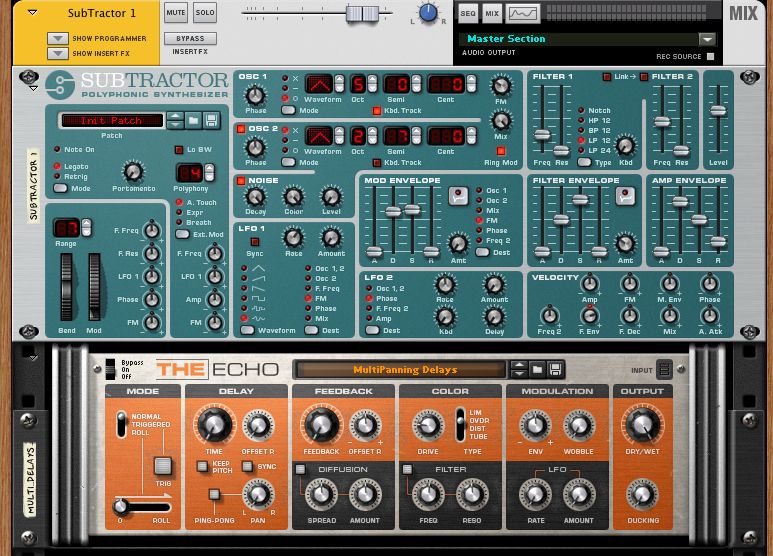
The delay unit is what creates the really wide sound – note that I used the “Multipanning Delays” preset and then I have unselected all the boxes under “Delay”, I have put the time to 0 and the “Offset R is at 8ms – just above 0 – that’s the important bit).
Good luck.. I’m sticking with Logic for now though..
bob6397
ParticipantI would refuse simply because it isn’t legal – as a DJ, I cannot play other people’s music (from any source) at all without breaking licensing agreements.
And then you have the practical side – I don’t fancy playing any track that I havent heard before and I simply couldn’t DJ a complete set if I didn’t know the tracks at all.
I also refuse point blank for anyone to plug anything into my laptop whilst I am playing if it (A) doesn’t belong to me or (B) I don’t need it plugged in. Plugging other people’s USB sticks/external drives is just the best way to crash something and/or get a virus in the process.
If they bring CD’s (and I have a CD player – which I don’t have with me any time I am DJing) you are back to my first point – how do you play a set which has flow when you don’t know the tracks?
It doesn’t matter how good you are, you have no time to actually mix if all you have time for is to just spend all the time listening to each track over and over in your headphones trying to work out which one to play next – that’s what prep is for – and why I never play a track i haven’t listened through at least 3 times. Ever.
Just my thoughts..
bob6397
ParticipantBeing comfortable is a very personal thing when it comes to headphones – the only aspects about a set of headphones that I would take a from a forum would be about the sound they produce and if they are worth the price tag attached…
Fit, earcup-size etc. are all so personal that you really need to go out and try them on to find out if they are for you…
Have a look at the headphone thread here for some other ideas.. 🙂 http://www.digitaldjtips.com/topic/headphones/
bob6397
ParticipantI thought you had grasped this earlier – your tops already have amps in. Therefore you will damage them if you feed them the already amplified signal from the subwoofer.
If you decide to ditch the crossover (an option), you should run:
Controller (RCA OUT) -> Sub (XLR IN)
and then (for each top separately)
Sub (XLR OUT) -> Top (XLR IN)
If you decide to get a crossover, you should run:
Controller (RCA OUT) -> Crossover (XLR IN)
Crossover (HIGH LEFT XLR OUT) -> TOP (XLR IN)
Crossover (HIGH RIGHT XLR OUT) -> Top (XLR IN)
Crossover (LOW LEFT & RIGHT) -> SUBWOOFER (XLR IN LEFT AND RIGHT)
That should work.. But DO NOT run the powered output from your sub into your powered speakers – you will end up blowing them up.
bob6397
ParticipantThe problem is that the switch one the back of your sub only affects the powered outputs from your sub – which you aren’t using. Therefore you do need a crossover to make it sound the best it can..
I didn’t notice the outputs on the behringer actually – that would almost make it enough for me to recommend it over the ART one.. maybe…
(And that link you just posted doesn’t work by the way..)
bob6397
ParticipantThat’s because I am fairly sure such a product doesn’t exist – people who use tops with subs tend to not bother of have a crossover in the sub..
That behringer one will work, but the ART one that Vintage suggested will do the same and is higher quality.. 🙂
bob6397
ParticipantThat ART one is still 2 way + sub – you need 1 way + sub – although you could use the art one as 2 way and just set the crossover frequency as low as possible – but then you might as well have bought a cheaper option os that one has lots of features you won’t need.
And I don’t have a clue what that second one is or does..?
ParticipantI like the principle.. but it seems like an awful lot of work for the mods who would have to do the sticking/unsticking/locking etc..
ParticipantTheir official point of view as follows (taken from the official thread in their forum):
“Today we were shocked to learn that one of our main provider for our ContentUnlimited Audio service, “Grooveshark”, has been found guilty of willfully uploading 4,907 recordings for which they didn’t have secured the proper licensing.
Of course, we immediately stopped to include the Grooveshark database in our catalog, until we can understand exactly what the situation is.How does that impact you, if you are a ContentUnlimited Audio customer:
First, the unlicensed situation concerned only 4907 tracks out of 15 million in the catalog. So most likely, all the tracks that you have been playing in the past using ContentUnlimited were properly licensed.
Second, if you need to work this weekend, do not worry: Though most of our “ContentUnlimited Audio Pro” catalog is now unavailable, the “NetSearch Audio” service is still working, so you can still search and play songs from within VirtualDJ, as usual. Also note that any “cached” content that you have right now on your computer, will still continue to play without any problems.We are working as fast as we can to understand more about this situation and find a long-term solution to bring back a full and high-quality catalog of properly licensed songs to you.”
So, basically, they have stopped some of it working, are trying to find a new provider and in the mean time they haven’t broken it.. So it will all still work until they find a solution – which is good from anyone who uses it’s point of view (I never have used it to DJ despite using VDJ though – I didn’t like the way I couldn’t import the tracks into iTunes to manage them and how most of it was rubbish quality..)
bob6397
ParticipantAs a (recent – my first gig was this time last year) beginner into this, I sort of agree with what you are saying, Kai.
But – you do not need as many tracks as you think you need. I play weekly 3hr (with a couple of breaks in) sets to a crowd of people that doesn’t change that much week to week, meaning that they like to hear variation in the music played but at the same time they do like some repetition from week to week – I play a total of around 40 tracks each week. For this, I have a “Core Collection” of around 180 tracks – that’s it. I don’t need any more than that and sometimes it even feels like too much.
One of the main problems with being a beginner is that you do not (yet) have that core collection – you don’t have all those classics that people want to hear and you maybe don’t own the right kind of music to DJ from (that was the case with my collection when I started). So you need to go out and build that – but quality over quantity, every time. Pick your songs. Listen to them again the next day before you buy them. Be really picky 🙂
I add tracks as they come out (They like hearing the latest charts releases.. mostly) and as I find them, and I have a clear out every month or so, getting rid of songs I haven’t played recently.
On a less regular basis, I DJ for a slightly different crowd who like a completely different kind of music – and this involves 4hr sets every now and then. So I prepped twice that in tracks – 8hr’s worth, which is around 130 tracks. No more.
So I have a total core collection of around 300 tracks, and that is it – that lets me know every track really well. If I hear another DJ play a track that I also have in my collection, I know it’s name (and bpm) straight away… Or within the first few bars. That way I can DJ instinctively rather than going through pe-prepped lists of tracks that I don’t really know very well. The results are nearly always better when you know the tracks – and that happens with a smaller collection.
On a different note, however, I do have a much larger collection of tracks on my hard drive that I use for storing the rest of my music – tracks that might get requested, tracks I actually listen to etc. This is around 3700 tracks big, including the 300 in my other collection. This way I can deal with (nearly) any request that i get given. One DJ I know who has been doing the same job as me but for much longer has a much bigger collection – approx 26,000 tracks. But he has the same system and knows the ones he plays most commonly very well indeed.
Back to DJ Pools, I don’t use them. I use iTunes and (very occasionally) the artists offers the track I want as a free download. I still check for it on iTunes though. I don’t see the point in DJ pools – if you don’t have a request, say you’re sorry you don’t have it, write it down and buy the track when you get home – if you think it might be requested again or if you actually like it… 🙂
If you are looking for songs of a certain genre, there are several methods to find them.
One is to find a song you like from that genre on sound cloud. Look at the “Recommended Tracks” list. Have a listen.. Any good? Often they are similar and sometimes they are decent. This sometimes also works on YouTube or iTunes, but they aren’t as good.
Another is spotify – create a playlist of all the tracks you have in that genre, then click “play spotify radio” on the top of the playlist. It will then play a load of tracks that a similar to ones in your playlist but NOT the ones in your playlist. Stick it on whilst you are trying to do something else and write down the names of any tracks that some up that you like.
Hope this helps,
bob6397
ParticipantOr use existing speakers and rent a generator and enough kit to even out the peaks in the power produced.. 🙂
The roland BA 330 often comes up when portable PA is mentioned, but I somehow doubt that 30W a speaker isn’t going to handle 350 people very well…
bob6397
ParticipantIf you were sticking to their system and using passive tops with the active tops, that would be true. However, you are not doing this. You have active tops to go with the passive sub. So, you need to set up as follows (and ignore the manual on this one)
Output -> Active Crossover (L&R)
Active Crossover (High Output L) -> Top (L)
Active Crossover (High Output R) -> Top (R)
Active Crossover (Low/Sub Output L&R) -> Subwoofer In (L&R)
The crossover will split the signal into the signal that the sub needs (30-150Hz ish) and the signal that the tops need (150-20000Hz). Then wire it up as above. This way you will get the max volume and best possible sound quality from these speakers. What this does is mean that the tops don’t waste amp power producing the frequencies that the sub is producing.
This should also let you be a bit more flexible with your speaker positioning as well 🙂
You should connect straight to the crossover from your controller, ideally through a box like the one that DJ Vintage recommended (http://artproaudio.com/isolators/product/cleanbox_pro/) so that the signal will be balanced. The crossover should use XLR sockets, and you should use XLR cables to connect the speakers to the crossover.
bob6397
-
AuthorPosts