
bob6397

Forum Replies Created
-
AuthorPosts
-
bob6397
Participant3 or 4 tracks is a lot – that’s about 10-15 mins of music. If you are just using 15 min mini-playlists and chopping and changing between them then it is probably fairly easy for your audience to start to spot patterns from week to week – something that you never want to happen as they then start listening for it rather than enjoying their night.
A suggestion could be to simply delete all your mini-playlists and start them afresh. I personally don’t use any playlists at all – other than if I am doing background music (as a mobile DJ) – but my sets are all unique and respond to the audience rather than being too scientific over the mixing (indeed – I don’t mix tracks through each other as the people I DJ to actually don’t like it)
A solution could be that you start doing what a few other people on here have done- which is instead of using mini-playlists, simply tag (maybe use the comment field?) each track in your collection with a couple of tracks that it mixes well with. This means that the tree-like structure of where you can go splits every track rather than every 3 tracks. This means that you will avoid repeating tracks in the same order more than just occasionally.
An example could be as follows:
Your current method:
LIST 1
Track 1
Track 2
Track 3 (TO LIST 2/3)
Track 4
Track 5
Track 6Wheras the other method could give you:
Start
Track 1 (To Track 2/3)
Track 3 (To Track 2/4)
Track 2 (To Track 5/6)
Track 6 (To Track 4/5)
Track 5 (To Track 4/7)
Track 4 (To Track 2/7)OR it would look like this:
Track 1 (To Track 2/3)
Track 2 (To Track 5/6)
Track 5 (To Track 4/7)
Track 7 (To Track 1/6)
Track 6 (To Track 4/5)
Track 4 (To Track 2/7)
etc..Does that make sense?? So you have the same tracks but many more ways of ordering them, which mixes up your sets..
Hope that helps,
bob6397
ParticipantHave you installed a driver from the Denon website? Often the driver on the CD is out of date before you receive it (the unit may have been in a warehouse for a few months before you bought it)
If not, I suggest doing so and that may fix the issue – beyond that, maybe ask the people over at Denon? They are really helpful and will have a lot more specialist knowledge than us!!
bob6397
May 17, 2015 at 5:48 pm in reply to: Need some advice and help as I'm new to DJing/producing.. #2195541ParticipantHI Cody,
Producing and remixing are 2 different skill sets (which often complement each other) but are not the same – it takes a certain level of musical understanding to take a track and change it into something different but that level is much higher if you are creating your own tracks from scratch..
And again there is a difference from remixing live and remixing in a studio environment. If you want to remix live, I cannot help you (although I would advise against getting older hardware and suggest choosing your software carefully – many people prefer Ableton for remixing over Traktor and I haven’t heard of maschine being used properly live by many people at all..) If you do get hardware, make sure that it supports the software you are using – You have mentioned 3 different controllers and all are designed for different software. The Maschine is for just that – Maschine (which apparently links to Traktor), the F1 is for Traktor natively and the Launchpad is designed for Ableton.. You need to make your mind up – download some trials!!)
BUT, if you are looking at remixing and/or producing in a studio environment, I wouldn’t be looking at any of the ones you suggested – indeed beyond a midi keyboard I wouldn’t get any hardware at all (I haven’t)..
What you would want in this situation is a DAW – Digital Audio Workstation – which is software designed for producing midi tracks/mixing audio and creating music.
Examples of this would be:
Apple Logic Pro X
Avid Pro Tools
FL Studio
Reaper
Reason
etc.Have a look at this thread for the pros/cons of all of these and more.. http://www.digitaldjtips.com/topic/daw-selection-help/
Basically, you need to decide what you want to do with the software, that will lead you to which bit of software to use (many do the same things but all have a different workflow), and that will lead you to how much hardware you need to work with it.
bob6397
ParticipantHi Frank,
There are a few things it could be. I’ll go through those in a sec. First, what could have caused it (and therefore what to do to prevent it) – have you at some point done any of the following?
– Plugged it into a different USB port
– Installed drivers for another midi/audio device, and, if so, does that device work properly? (they may be interfering with each other)
– Installed any new software (at all)
– Updated any drivers for any other bit of hardware on your laptopIf the answer is yes to any of these can you tell us (If the following doesn’t help) ?? – Information is power when it comes to problem solving!!
A possible solution:
(If you have not already done so, I would strongly suggest updating to Windows 8.1 over 8 – go through the “Store” app to do so.)
– Update Windows fully if you have not already done so (Using Control Panel -> Windows Update)
– Uninstall any drivers for the numark (Control Panel -> Programs and Features) – remove anything with the word “numark” in either the program name or publisher.
– Restart
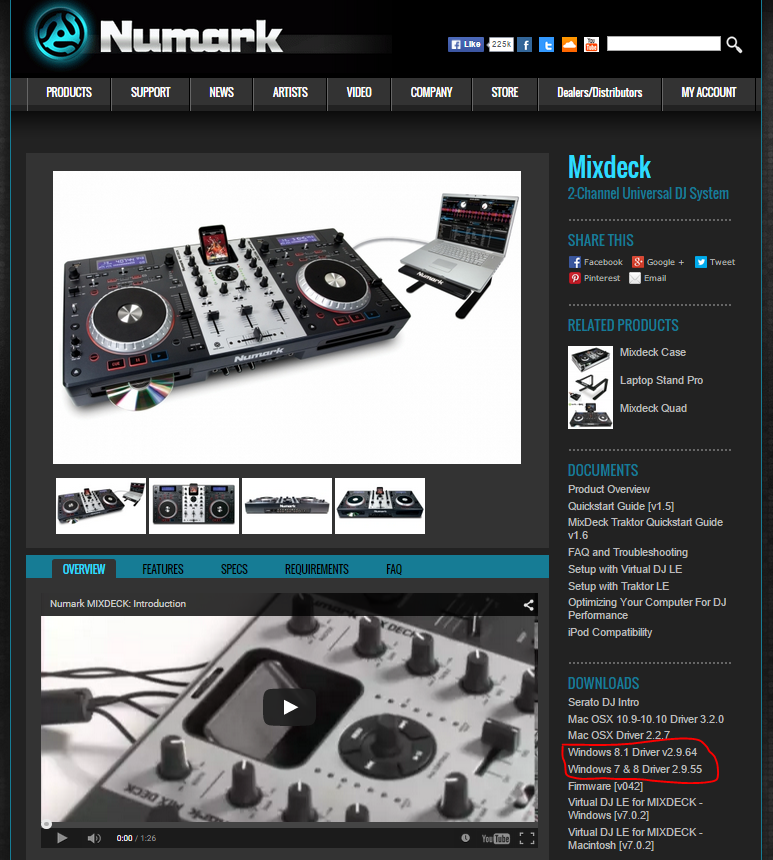
– Re-install the correct drivers from Numark – with the Mixdeck plugged into the USB port you want to use to gig from whilst you do so (use the link shown on the screenshot below).
– Restart without the mixdeck connected
– Connect the mixdeck and wait for windows to register it.
– Check Device Manager. If it is showing as unrecognised, right click, properties. Go to driver, click “Update”. Select “Browse my computer manually for a driver” then find the file with the driver in it where it downloaded it to before, select it and let it chug for a bit.
– If it showing all fine, go to: Documents -> Virtual DJ. Rename the “Settings” file to “Settings2”
– Start VDJ – it will load up as if you have never launched it before – do not worry!!
– Select the audio device. It should hopefully now all work fine. If, at this point, it stops working again then you know that the issue lies with the link from your controller to windows, not with VDJ.
– Close VDJ
– Go to the Virtual Dj folder again. Delete “settings” and rename “settings2” back to “settings”.
– Launch VDJ again, and select the audio device.
– Check in device manager. If it has gone wrong now, you know that the issue lies with your VDJ settings..Hope that helps – tell us whether it does or not and hopefully we will be able to help you if it doesn’t!!
bob6397
 Participant
A DJ’s way of finding new tracks is normally their best kept secret lol.. It’s what separates you from the crowd if you have the right music – and the methods vary depending on what kind of genre’s you play. I play a wide variety of music, a lot of “Classics” – not in the traditional sense but to this very particular crowd. But most of the new stuff I find is either in the charts of a bit funkier/occasionally a bit of Deep House or Blues in there as well.
For the charts, I have a weekly look down the chart lists (I’m in the UK) and listen through on youtube. I save links of any tracks I like in different folders depending on how much I like them. Roughly a week after I have added the last lot, I go through and refine it and buy maybe 2 or 3 tracks from that collection.. Also useful for charts are the radio (A, B or C) playlists, which are often published by the radio station online. I tent to use the lists for BBC Radio 1 as that tells me what is being played and how much on the radio without having to physically listen to the radio myself all the time..
For more obscure genres, I use Spotify radio. This lets you upload a playlist, and then Spotify will play a load of tracks similar to the ones in your playlist but (Crucially) not the ones in your playlist. This is great for sticking on in the background for finding new tracks.
For finding remix’s, I tend to use youtube (where most of the ones I have found have been posted), or I find one I like on soundcloud and often in the “Recommended” section there are some decent tracks/remixes. Problem with this is that it is very personal what is a “good” remix and what isn’t – presumably at some point the person who made it must have thought it was “good” enough as they published it!!
It’s really up to you to find you own tricks. These are mine and I am doing alright so far – I hardly ever get requests and have a crowd following me now (I have only been DJing regularily since September) so I must be doing something right!!
bob6397
ParticipantIf you aren’t too fussed about sampling, have a look at the Denon MC6000MK2 – awesome controller, built like a brick and it will go forever. Standalone mixer, 2 fully working mic channels and it comes with a full version of Serato. Also supported by Virtual DJ, Cross (I think)..
BUT choose your software first, then buy your controller to match. If you end up on Traktor, I would recommend getting Native Instruments hardware as they are moving away from supporting other people’s hardware. If you end up on Serato, the vast majority of controllers come with either Serato Intro (a stripped out version of the same software) or the full version of Serato. Pay attention to this then you don’t need to buy a license twice.
If you end up on Cross DJ or Virtual DJ, there are mappings out there (and many are supported natively) for pretty much any controller out there – and (certainly with Virtual DJ) it is easy enough to map your own if there isn’t.. 🙂
Good luck hunting!!
bob6397
ParticipantYou have pretty much answered your own question..
My tip would be to:
– Not flood yourself too much with new music to start with – You won’t be able to DJ as well from a load of music that you don’t know – having said that though, if you’re playing that sort of music as background then you might as well prep a basic playlist before hand – it is hard to read a room when they aren’t focused on you!!
– Don’t bother with showing off your amazing mixing skills when no one is listening (IE when you are playing as background) – no one will notice and your effort will be wasted.
– Remember that people will start dancing when you play stuff they want to dance to – not that you should start playing popular stuff when they start dancing – it’s the other way around. If you suddenly change genre just as you get people up they are just as likely to sit down again..
Just my thoughts.. Good Luck!!
bob6397
ParticipantThat just didn’t work I’m afraid Vintage.. I can see the [IMG] tags and the link is broken if you copy it.. You’d think the mods would have some clue as to how the forum works.. 😉
EDIT: you fixed it.. 🙂
ParticipantWorks fine for me.. must be a Holland thing Vintage.. 🙂
ParticipantPersonally loving this at the minute.. Simple but chilled beat – and a bass riff that could blow your speakers.. 🙂
Title: Outlines
Artist: Mike Mago & DragonetteGenre: Not quite sure.. A variant on house of some description.
ParticipantThe main issue with controllers (all of them) nowadays is that increasingly controls are being added to them that are for functions in only one bit of software – this has been the case for a while with Ableton controllers – and whilst you can use controllers with software that they aren’t intended to be used with, they work with the software better if you do.
A prime example of this would be the Traktor S8 – which has no jogs, and faders on the deck sections specifically designed to work with remix decks and (eventually) the new stems format that they are bringing out.
On the other side, I don’t see any Traktor hardware supporting the “Flip” effect in Serato any time soon… 🙂
And an additional advantage is that everything is plug and play when you use hardware with spftware it has been designed for – the mappings are built in.
That’s why we say choose you software THEN controller to all the beginners.. It makes more sense in the current market.
bob6397
ParticipantEveryone has to start somewhere!! (BTW, I don’t use a controller at all – I have just mapped my keyboard for everything I need.. I don’t need one for my style of DJing though and I made that choice consciously 😉 )
Carrying around a Laptop isn’t too hard – indeed, I suspect that some of you (being students…?) carry one around anyway most of the time..?
The most important thing by far though would be to choose a controller based on what you need from it – write down what features you want/need – and what software you use (If you use Traktor, buy NI hardware and don’t bother with anything else as they soon won’t support it in all likeliness). once you have decided that, we’ll be able to give you a more definite answer.
Of those that you mentioned, I would go for the DDJ-SR followed by the SB, and I am not altogether sure why you would need a DJ mixer if you don’t have any players to plug into one..?
I would advise you to stay away from the Behringer kit though – their kit looks awesome on paper for features/price but unfortunately there are just too many horror stories about their kit for anyone on here to even bother recommending them – I myself had a Behringer PA mixer die on me in November – the master volume started to change the volume of its own accord (really audibly) half way through a gig. I bypassed it, managed without a mic and played on but it wasn’t ideal. I replaced it with a similar but far superior Yamaha mixer – much nicer and it will last 10 years if I treat it well.
Hope this makes sense – give us some answers (including a rough budget?) and we’ll be able to help you a bit more!!
bob6397
ParticipantMy advice would be to make use of the playlist folders in iTunes – start off by sorting out your playlists into different folders – I do it by date with a different set of folders for the different types of DJing I do – so I have a “Weddings” folder, and in that are other folders, such as “15-01” or “15-02”. And then my playlists are in there – following a specific format for the name. As DJay 2 (my backup) doesn’t read playlist folders (out just displays them all in one huge list), I use a format which describes which folder it is in and the date and then the event name – so an example would be “WED 15-01-05 Large Wedding 80s Music”
What I also do is never download a track during a gig – unless it is really important. I have all my tracks organised in a proper folder structure in one place on my hard drive (iTunes does this for me) and then I have my entire music library analyzed in my DJ software.. That way I have instant access through the search function to any track in my library…
Up to you how you do it – the important thing is to have a system 🙂
bob6397
ParticipantThat article suggests that (for reasons I can’t work out), you would need another license if you wanted to use an “Upgrade Ready” controller on a version on Serato that came with a “Serato Enabled” controller.
If this is the case (you won’t actually know for sure until you try it, I think), that is frankly ridiculous. It effectively means that a lot of the advantages of getting a controller which supports (and comes with) Serato are useless…
I can’t quite get my head around how much of a rip-off that is – it is bad enough that it won’t work without specific hardware connected – but for your license to stop working if you swap controller? That’s ridiculous.
bob6397
ParticipantIf you want a set up without a controller, decent gear is not going to be cheap..
The cheapest no-laptop solution would be something like a Pioneer XDJ-RX – an all-in-one controller which doesn’t need a computer. That will set you back around £1,100.
A complete separates system (with 2 x Pioneer XDJ-1000’s and a DJM900) would cost in excess of £3000. And if you change that to CDJ-200’s, the cost would be over £4500.
A cheaper alternative could be a pair of Numark NDX500’s and a Allen & Heath Xone 23 Mixer – that would set you back around £600.. But it wouldn’t be as good as other, similarly priced pure-digital options. And with the numark players you lose the advantage of Rekordbox – IE the ability to cue your tracks before hand and store them with the tracks on the USB’s as that is a Pioneer system.
In my opinion, cheap isn’t worth it – for a reliable, decent-sounding system you are going to need to spend money, unfortunately.. The cheapest option (by far) would be to get a decent controller (Pioneer DDJ SX2/Numark NV/Terminal Mix 8) that would cost between half and 2/3rds what a proper no-laptop solution would cost for a similar outcome, but would have much more flexibility.
But – this is a digital-DJ forum. Our automatic response is “Why would you not want a Laptop”.. So you might be in the wrong place. But, seriously, don’t bother going too cheap.
bob6397
-
AuthorPosts