
bob6397

Forum Replies Created
-
AuthorPosts
-
bob6397
ParticipantCan we go back a second?
From what I see, you have 3 options to get sound out of your launchpad.
1) Send the Ableton output through the headphone port on your laptop and plug that into an analogue input on the SX. You would then have control of Ableton on that one fader on the SX. Less than ideal..
2) Send the output from ableton straight to the main output of the SX. This would mean that the only volume control (I think) would be the master volume on the SX – not ideal but it would work.
3) Use soundflower (awesome program!) to route the audio from Ableton into a “Live Input” in Serato and use one of your decks (I would suggest 3 or 4) for that purpose. This would additionally let you use all the Serato effects on the Ableton channel if you so wanted. This would probably be the easiest to setup and would just work everytime you opened it up as it routes through software. What I am not sure about is how much latency soundflower has and how to set that up in Serato.. but it can’t be too hard 🙂
What are you trying to achieve? Using on of the faders on the SX for controlling the output of Ableton? Options 1 or 3. Simply get an audio output without a volume control? Option 2.. Up to you 🙂
bob6397
ParticipantDon’t know.. Never uploaded anything to soundcloud.. If I do upload anything, I’ll upload it as MP3 from what you’ve said.. Glad you’ve found a solution anyhow.
bob6397
ParticipantSo you don’t need to install any drivers – fair enough.. Can you show us a screenshot of the setup in Ableton? Might be easier for us to give you tips.. 🙂
ParticipantWhat are you trying to achieve with said mixer? Your mixtrack quad is already a mixer in itself – are you trying to add more stereo inputs? Or more Mic inputs?
Specifics would help.. 🙂
ParticipantIs your browser’s volume set right in the volume mixer (if on windows)?
Other than that, I doubt that anyone will notice.. Are you sure that Audacity has mastered it properly? If you play it back through (for example) media player/iTunes does it still peak at -5dB?
No one will notice though, seriously.. There is enough rubbish on soundcloud that just being a little bit quiet won’t make you stand out as being “amateur” – although it is unmastered – proper mastering is an art in itself and usually needs a better DAW than audacity for it to sound good – I master in a new Logic project when I have done a mix (after bouncing the mix out of Logic) and still consider my mastering to be sub-par.. 🙂
ParticipantI find the same thing with my Audio Technica’s (and indeed any other studio-biased flat freq. response headphones out there) – these studio headphones are designed to show up the flaws in the music so you can fix them whilst you are mixing a track (in a studio sense not a DJ sense) but that unfortunately makes them hard to listen for long periods of time (if you are truly listening to the music).
For that reason I use my Beyerdynamic DTX101iE’s for listening to music (Awesome sounding in-ears – really musical..)
bob6397
ParticipantOnly you can know – everyone’s heads are shaped differently. They are awesome headphones and many many people love them but headphones are a very personal thing.
If you aren’t sure, I would advise getting them from somewhere you can return them to without any hassle just in case..
ParticipantYou get all the plugins from Logic Pro X in Mainstage??? All 40GB of them? Didn’t know that..
My copy of Mainstage (1!) came with my copy of Logic Pro 8 and it is one of the worst user interfaces I have ever used. DOn’t know about the latest version though.. I certainly have never even considered it as anything more than something to play around on and I nearly always end up using full on logic by the end of the session.. Can’t stand it..
To the OP:
(To add on what the previous person has said)I would definitely choose your software first. The vast majority of controllers are designed to work with specific software (The Novation Launchpad with Ableton Live for example) and therefore what software you use will have a huge impact on the hardware that you buy.
You have listed a frankly huge list to here’s my brief opinion on them..
JB SYSTEM BPM 4USB – Never heard of it. From google it looks like a cheap DJ mixer. I wouldn’t buy – not sure you need a mixer anyway – and surely you would want one with a soundcard built in if you did?
Akiyama MCE 4 USB – Same as above.
Akiyama MCE 3 USB – Same as above – as well as me being even more skeptical as I have never seen a 3x Stereo channel mixer before.. odd.
Allen Heath XONE 22 – The first bit of pro-level equipment on this list. Decent, well known mixer. Only 2 channels though – you need to decide how many channels you want before you buy a mixer (if you even want one?)
Allen Heath XONE 10 – This looks like a controllerists’s dream. Completely midi mappable (but with jogs?). You would need to have the know-how to program your software to use this to it’s full potential. Allen and Heath gear is always good quality. (PS I think you mean the XONE 1D – Am I right? XONE 10 came up with nothing on google..)
Behringer CMD DV1 – Cheaper end of the scale but similar to the above controller. Looks like a mini effects control unit but with some extra buttons? I wouldn’t personally buy due to the Behringer badge (bad experiences) but possibly good as a controller.
Behringer CMD DC1 – Similar to above but with less rotaries and more pads. Basically just a lot of buttons for you to program – couldn’t your laptop’s keyboard do this for now?? I wouldn’t personally buy due to the Behringer badge (bad experiences) but possibly good as a controller.
Kontrol X1 – Native Instruments hardware. Dedicated Traktor control unit. MK1 or 2? Worth knowing. Basically an effects control unit for traktor with some transport controls included.
Kontrol Z1 – Native Instruments hardware. Dedicated Traktor control unit. Built in audio interface and software mixer controls. Filter/EQ controls as well. I wouldn’t buy this and a dedicated mixer – they do much the same thing.
Traktor F1 – Native Instruments hardware. Dedicated Traktor control unit. Remix deck/sampler controller. Nit much use for anything else – only buy if you use Traktor remix decks.
I would advise against buying any of the NI hardware if you don’t use Traktor. Just as I would advise against using any other manufacturer’s controller with Traktor..
That’s my summary. It is an odd and mismatched list that gives the impression that you need to go out and do some research into what you want from your software and, indeed, your hardware.
Decide on software first – whether you want to use Ableton Live, Traktor, Serato, Virtual DJ or Cross DJ. Download some software trials and decide. Then you might know what hardware you need and how you will set it all up.
bob6397
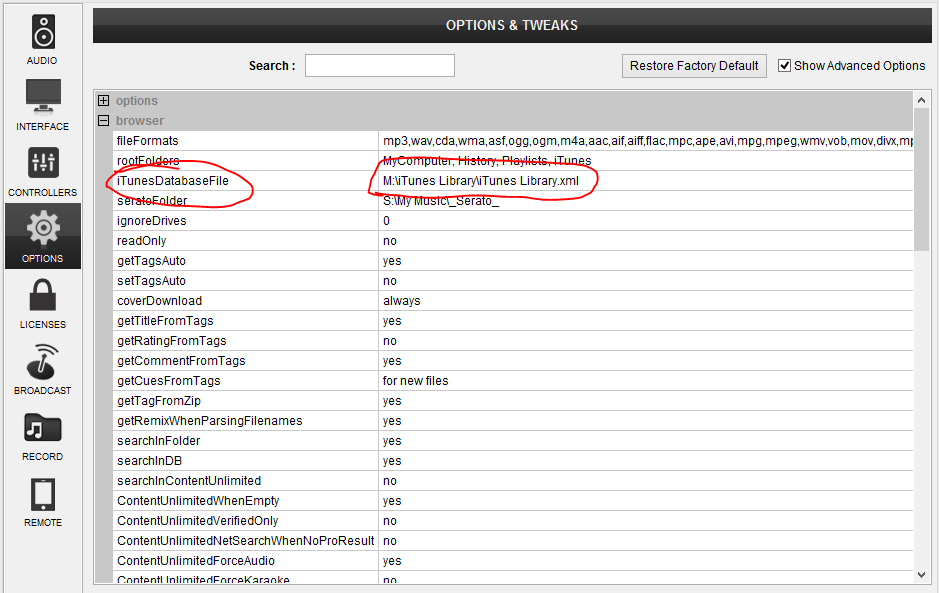
ParticipantHave you set the iTunes database file path in VDJ?
If you haven’t, try going to Settings -> Options (Make sure “Show advanced options is ticked top right) -> Browser as shown below. Check the File path actually points to your iTunes library..
 Participant
Lol.. I can vouch for that – I use the series that Terry is talking about – the Inspiron series – and the cooling is rubbish. Thank god that I don’t DJ in hot rooms or do anything too intensive.. A better cooled laptop is on my wish list!!
I have a dedicated nvidia card in mine – which I don’t use – but I wish I could. If my laptop had the cooling to match the processing power, I could run whatever I liked on it.. 🙁
As he said though – the XPS will probably be fine.. 🙂
bob6397
ParticipantFirst of all, I would update to Virtual DJ 8. Many more features, better laid out and with better support for later hardware that simply wasn’t released when VDJ 7 came out. Free upgrade for PRO Infinity license holders..
Secondly, Are you using the speaker outputs on your controller to go to the speakers? If you aren’t, why not? That would be the logical way of doing things..
In response to your first point, I doubt that it is a latency issue – if it was latency then the whole audio signal would be delayed and tit would sound correct out of the master out if it sounded right mixed in your headphones correctly. BUT if you were matching what was in your headphones to what was coming out of the speakers AND your headphones were plugged into your controller but the speakers weren’t (or the other way round) then it could well be a latency issue. Try plugging it all into your controller and see if that fixes it.
In response to your second point, I don’t know what might be causing it. Do you hear the crackling through both your headphones and through the speakers? Are they both plugged into your controller? If yes to both, then it is an issue with your VDJ settings. If the answer is no and yes (in that order) then it is a cabling issue somewhere and not VDJ. If it is yes and no (in that order) then it is a problem with your VDJ settings. Plugging it all into your controller may help.
So, in conclusion, I would update to VDJ 8 and then make sure everything is going through your controller.
bob6397
ParticipantMight be worth reading a few of the other topics from people in a similar situation to you…
My advice:
1) Choose your software – whether it is Serato, Traktor, Virtual DJ, Cross DJ or DJAY Pro we don’t mind but it is important as most controllers are designed with a specific software in mind and therefore work best with that software – though most controllers work with most software.
2) Decide what you want the most from your controller – IE what features. If you don’t know yet, I would recommend getting a cheaper controller (Numark Mixtrack Pro 3/Pioneer DDJ-SB/Reloop Terminal Mix 2) and working it out before spending more money on the controller that works for you.
3) Decide whether you want an audio interface built in or not. Most (almost all) DJ’s do. This means that the audio is produced by the controller and not through either an external audio interface or the interface built into your laptop.
4) Decide whether you want an All-In-One or a Modular setup – most controllers are all-in-one but many DJ’s swear by building their own controller layout with the features they want by using a much more customisable modular setup. if you aren’t sure, go for one of the ones I mentioned in (2) and you’ll be fine for now..
In your position, I would download some software trials (if you haven’t already) and decide on software first…
Good Luck!!
bob6397
ParticipantWill the files play through iTunes?
If they do, and it still doesn’t work in VDJ, close it, go to “Documents” -> “Virtual DJ” and try changing “database.xml” to another file name (e.g. “database2.xml) and the same for “settings.xml” and then re-launching VDJ.
That should reset the database and the settings, letting you view everything as if it is a new install of VDJ. Then see if it works..
bob6397
ParticipantHave you installed the drivers correctly? If you haven’t (or if the wrong kind of drivers are selected in Ableton – it should be ASIO not Windows Direct Audio or equivalent) then it could show up like that?
bob6397
ParticipantI wouldn’t use my DJ headphones for wearing when I’m travelling.. I’ll stick to my in-ears for that – they sound better!! UPt o you though..
Neither will be especially comfortable for wearing for long periods of time. From my point of view, you have 3 options.
1) Don’t wear your glasses. This might well not be possible if you have bad enough eyesight so that this wouldn’t work.
2) Wear contact lenses whilst DJing/Wearing your headphones – this means that you won’t have to bother with comfort when you have your glasses on but may well not be practical if you want to use them all the time.
3) Use in-ear headphones when DJing/travelling. Many in-ears offer better noise isolation than over-ears anyway and can be more subtle.. If you do use in-ears though, most people mix “in headphones” – IE with a split cue or with a lot of use of the “Cue Mix” dial…
Those would be the possible solutions from my point of view.. I went for option 1.. 🙂
-
AuthorPosts