
bob6397

Forum Replies Created
-
AuthorPosts
-
bob6397
ParticipantI reckon your best bet would be to use something like this (DJ Tech DJ Rec – half way down this page http://www.digitaldjtips.com/2015/04/musikmesse-2015-best-rest/)
As that will simply record the whole mix from the output of your mixer.. I can’t see another way to do it..
bob6397
ParticipantI would disagree there Arnaldi..
Whilst many jobs require a degree, many (notably more practical subjects) do not require a degree to work in that area – hence the huge uptake on apprenticeships at the minute in the UK. Music/Music technology is another area that often does not require a degree.
However, expanding your knowledge on a subject can never be a bad thing and you almost definitely learn new ways to use skills (and new skills) and learn the theory behind it all..
bob6397
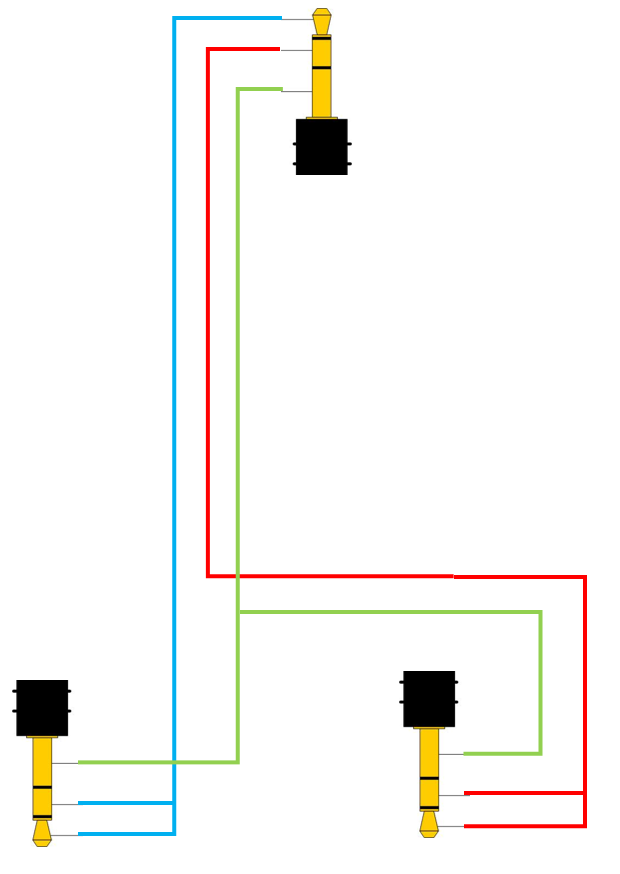
ParticipantWhat a DJ Splitter does is send one side of the output (EG LEFT) to one 3.5mm socket and the other (EG RIGHT) to another 3.5mm socket. This lets you have a separate headphone output to your main speaker output from one 3.5mm jack, although both of course will be in mono. Below is a wiring diagram that should hopefully make sense.
The top 3.5mm jack is from your laptop/tablet, the bottom left one has all the left signal and the bottom right one has all the right signal.
Blue = left signal
Red = Right signal
Green = Ground SignalNote how the left is wired to 2 pins on the bottom left jack and the same for the right – this means that the signal comes out of both headphones.
Normally the bottom 2 would be socket’s but I couldn’t find a decent diagram of a 3.5mm socket online.. so you will have to imagine it it one.. 🙂
bob6397
ParticipantDepends on the venue as to whether the Mixtrack Pro is an acceptable bit of gear. It is definetely a “prosumer” controller rather than a “professional” controller.
However, don’t let this put you off. Go for it – and if you absolutely rock it then no one will complain about your gear.. apart from snobs.. 🙂
Good Luck 🙂
ParticipantI had a similar (sort of) gig recently – it was a Leaver’s function at school – not the ball, that comes later – and they wanted some music on in the background for 1-2hrs..
So I (as I knew before hand – and I keep nearly 4000 tracks on my iPod anyway and there is something from pretty much every genre) put on a playlist of deep house/some funkier/some chilled out tracks – and it went down perfect. No one asked to change anything and a couple of people asked for track names along the way – which I take as a complement 🙂
That was just from my ancient iPod touch on the standard music app – but it was (crucially) background music – which it sounds like your impromptu gig turned out not to be. That meant that people weren’t actually listening to the music directly, they were just happy to have something there as it aides conversation and softens arkward moments.. 🙂
What you can’t do though, is have an audience who expect you to have everything – if you were told about it in advance, fine. But otherwise? They haven’t got a chance and you need to tell them that.
I would probably (in this case) have played stuff from other people’s phones – but only if I had my headphones with me and a spare jack cable so that there would be less transfer time (IE set one up whilst the other is playing). It’s a difficult one though.
What was especially difficult in your scenario is that you had an audience who did not share much musical interest – the 2 groups wanted completely different things. This would be difficult to cater for even if you had all your library with you (and this is a type of gig that only a certain type of DJ would relish..) but as it was impromptu then I reckon you can be let off…
I handle requests in a simple manner – “I’ll get it for you for next week” – BUT that only works well when (like me) you have a gig every week with the same people attending – but they don’t attend purely for my music, that’s not the main draw.. it is a factor though – if I’m not there the night’s don’t go as well… 🙂
You’ll need to find a system.. Good luck 🙂
bob6397
ParticipantYeah, it was a 4-in-4-out card. But the OP’s screenshot shows that Ableton views it as a 2-In/4-Out soundcard.. That’s where I have based a lot of this from..
That’s why I reckon that it hasn’t presented itself as a 8-out device, but rather as a 4-out device..?
Will do.. 🙂
bob6397
ParticipantI think you may have misunderstood me Vintage..
What I was getting at is that Ableton is just seeing a 4-out soundcard. And I doubt that those 4 channels are routed to the 4 decks separately -surely it should be an 8-out soundcard if that was the case?
I think that the SX in this case is simply being used as a midi controller for the decks in Serato (depite being a mixer itself) and that the soundcard is simply presenting itself as a master out + headphone out – even if Ableton doesn’t support this.
Meaning that if you sent any audio to channels 3-4 it would just come out of the headphone output. I don’t know why this is the case (and indeed only the OP can confirm anything when he/she tries it out) but I doubt that the output channels correspond to the channels on the SX..
bob6397
ParticipantMore of that sort of thing? That’s pretty much all there is to it – now you need to learn the theory..
An alternative (which most DJ software supports) if you are not musically trained that can be easier to remember is the Camelot wheel. Similar to a circle of fifths but it instead of the key being represented by a letter it is represented by a number (plus some other stuff) – might be easier for you to learn and pick up on than the traditional way..
Read more here (ignore the bit about buying the software..) http://www.mixedinkey.com/HowTo
Good Luck and get Learning!!
bob6397
ParticipantThis is basic musical knowledge – I learnt about this after playing an instrument for 10+ years and doing Music GCSE and Music Tech A Level..
There are 2 types of key – Major and Minor. Major keys sound happy, grand etc. whilst Minor keys sound sad, depressed.
The difference between the 2 is that the 3rd and the 7th note in the scale is flattened in a Minor scale compared to the Major – for example:
A C Major scale uses the following notes: C, D, E, F, G, A, B, C
Whereas a C Minor scale uses the following: C, D, Eb, F, G, A, Bb, C (The little b means that the note is flattened – IE one semitone down from the note it was at in the major scale)The difference between the 2 can be used in all sorts of different ways when composing.
THEN you have the different keys themselves – a circle of fifths can be useful here:

The letters round the outside represent the letter of the Major key with that number of Sharps (raising a note by a semitone) and Flats (Lowering a note by a semitone). The letters increase by a fifth each time – G is a fifth above C. Around the right hand side the letters increase by a fifth each time and a sharp is added, and around the left hand side the letters decrease by a fifth each time and a flat is added.
The letters in the middle are the corresponding Minor keys to each Major key – IE the Minor key that has the same key signature (the name for the number of flats and sharps) as that Major key. For example, the corresponding Minor to C Major is A minor.
Does that make sense?
That is basic music theory which you should know some of if you want to achieve harmonic mixing – for example a song in one key will almost always mix well with another song in that key OR a song that is a fifth above or below that key. Most of the time.
Oh, and by the way, if you want people to help you it’s generally not a good idea to put comments that read quite as sarky as the one you put above, Baltazar. Your original post didn’t even read like you had written it in English..
bob6397
ParticipantJust a load of boxes you can select Vintage.. This is mine (when set up with my Creative Soundblaster External card on ASIO)
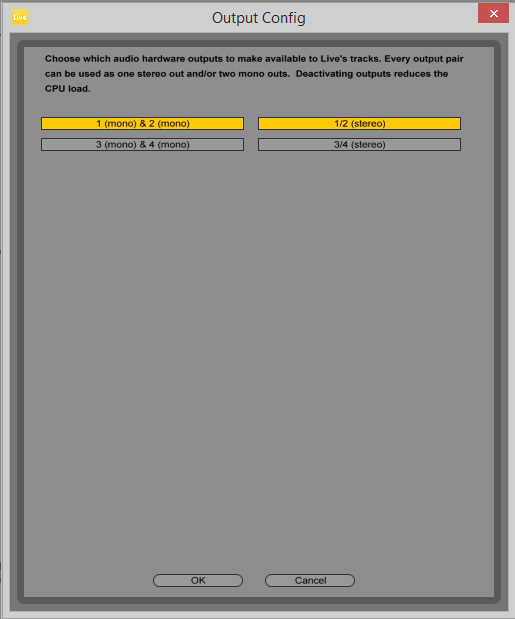
Not much use I’m afraid – just lets you select which channels the audio goes through – but since Ableton views the SX as a 4 out soundcard, I am assuming that 1-2 is master out and 3-4 is the headphone out…
bob6397
ParticipantYes to the ableton setup.. Not sure in Serato (I’m a VDJ person..) – anyone else got a clue how to set up Live Input/Direct Input into a deck in Serato?
I could do it in VDJ/Ableton/Traktor.. Not a clue about serato though.. It should be possible.
ParticipantCan you not do it through software? On my soundcards (almost all of them lol) I have a “What-U-Hear” function – it essentially presents itself as an extra, digital, mic input to the computer and therefore i can select it as the microphone in Movie Maker.
Means that there is no “digital -> analogue -> digital” nonsense going on.. Does the SX2 not support that?
bob6397
ParticipantUpdate: I just did exactly what you want to do in movie maker..
– Open up a new project.
– Click on “Webcam Video” Top leftish – Under the “Add” section of the ribbon on the “Home” tab..
– Select the webcam and audio device
– Hit Record
– When you press stop it will ask you where you want to save the file.. Done.I just did it for me, bouncing audio out of VDJ through one of my external soundcards into Movie Maker and the VDJ audio has recorded with the webcam not the webcam audio..
Does that work for you?
bob6397
ParticipantWhat software are you currently using to record the video??
ParticipantAre you on windows? And do you have the audio recorded from the controller as a separate audio file?
If you do then I would record it as it is, then import the audio into windows movie maker (available at http://windows.microsoft.com/en-gb/windows-live/movie-maker if you haven’t got it already)
Import the audio from the controller over the top (and sync it in time – I recommend you do something at the start before you mix eg. one, short scratch or simply you pressing play and pause quickly so that you can sync it easily..)
Then mute the audio from the webcam.
Once you have exported it you should have what you want.. The same thing can be acheived through iMovie if you are on mac.
bob6397
-
AuthorPosts