
bob6397

Forum Replies Created
-
AuthorPosts
-
August 19, 2015 at 1:35 am in reply to: How do I approach sharing the night with another act? #2241251
bob6397
ParticipantI would contact him – get an email address for him – and say the following:
1. You are the DJ for the night and basically introduce yourself
2. You were wondering if he could provide a set list so that you can avoid playing any tracks he sings (as a rule, I would never play a track that is being performed live.. It often doesn’t reflect well on the live performer and that can upset them..)
3. Does he want to plug into your PA so that he doesn’t have to use his own? (I would make the offer if it was me – he may say no – but I would rather only need 1 setup in the room and then it looks a lot neater than having 2 sets of speakers etc.)Basically – Contact him, ask a few questions, but make sure that you are polite about it – getting off on the wrong foot now will not help when the day arrives.. 🙂
bob6397
ParticipantHave you got a spare USB cable you could try..? If it’s that, it might save you a lot of hassle..
bob6397
ParticipantSounds similar to what I managed to get working when I tried to use ASIO4ALL with Ableton..
Try pressing buttons to turn outputs on and off in the ASIO4ALL settings until it worked. My issue was that I was trying to get it working with 2 external + 1 internal soundcard with a total of 10 channels of output and 10 input channels between them.. It was unbelievably complicated..
I never managed it and I am apparently quite good at things like this – good luck 🙂
ParticipantI’m going to assume you aee on PC for this.. If you are on Mac then just say..
There are several options.
1. Windows is mucking up your soundcard and getting confused when you plug the controller in.
To Solve (Hopefully):
– Right click on the speaker icon in the taskbar
– Select “Playback Devices”
– Select your internal card (Normally called “Speakers” and it should have “IDT” or “Realtek” or similar written underneath)
– Select the “Set Default” button.
If this doesn’t work, keep going..2. You have the settings wrong in VDJ. You say you have tried every combo but quite frankly I think you may just be doing it wrong..
– Go to Settings
– Go to the “Audio” tab
– Select “Speakers Only” and then “Internal Card” along the top.
– Hit “Apply”Hopefully that will work – if not, keep going..
– Still on the audio tab, use the manual config table to set it up right.
– The columns should be as follows:
— Source: master
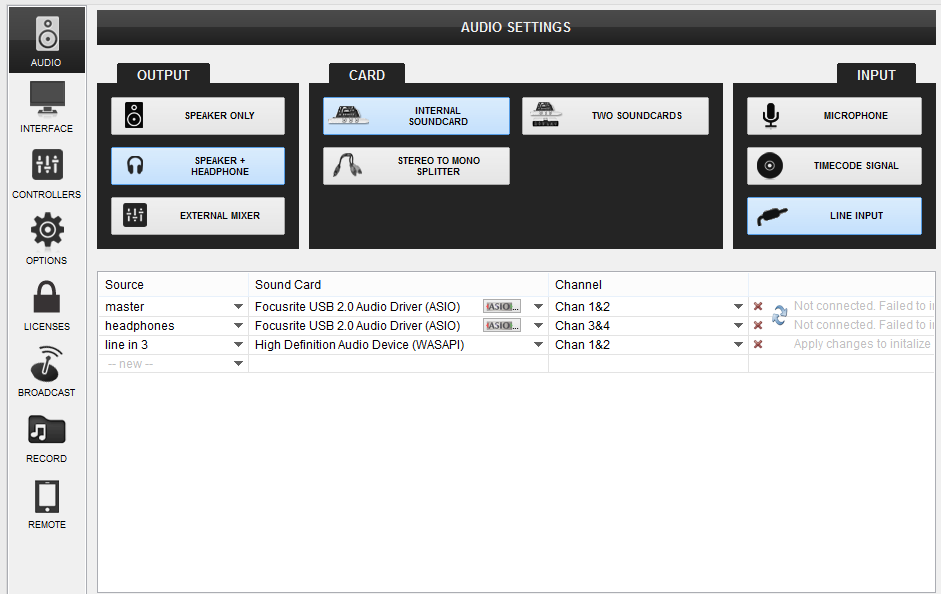
— Sound Card: (**The name of your internal soundcard in your laptop**) Mine is “High Definition Audio Device”.
— Channel: 1&2
— **The last column is automatic**Hit Apply.
It should look like this:

3. If it still doesn’t work, go to the “Options” Tab.
– Select “Show Advanced Options” (top left)
– Go to the “Audio” section.
– Make sure that “exclusiveAudioAccess” is set to “Yes”
– Close settings and try again.If it still doesn’t work, then I don’t know what the issue is – assuming of course that you have the master volume set right in VDJ, (and that the master volume control on your controller is up as well as the channel faders and the crossfader is in the right place?).
Good luck..
bob6397
ParticipantOn a mac the solution would be to create an Aggregate Device.
However (unless someone can point out to me how), I have never been able to find an equivalent option in Windows – and Traktor will only work with one soundcard at a time..
The only DJ software I know of that lets you use multiple devices is Virtual DJ..
A possible solution might be to use ASIO4ALL (available for free on the internet), which should allow you to do this, but it can be tricky to get working and I never did quite get it working right…
bob6397
ParticipantIf someone won’t consider you because you write an invoice or want a receipt (I always have some proof of payment for accounts purposes) then I would walk away.. Having said that, not everyone can afford to be as picky and I am lucky that the people I DJ for take it very seriously indeed – my local manager would struggle without me so we stay on friendly terms… 🙂
bob6397
ParticipantI’ve never had problems sourcing the exact version of the track I wanted through iTunes – most of the time it just requires finding the “EP” or “Remixes” version of an album if you aren’t after whatever the single was released as…
I buy about 90-95% of my music through iTunes and have never had an issue..
bob6397
July 22, 2015 at 5:31 pm in reply to: Can i use my Hercules DJ Control MP3 to adjust my pc sound ? example: YouTube #2227921ParticipantIt should be almost exactly the same to setup – if your version of VDJ allows it. The free version (AKA Home Edition) won’t allow you to do this. An LE version might – if you are lucky..
The only difference (in theory) is that the menus look slightly different.
I personally haven’t used v7 since 8 came out a year ago now – so I actually can’t remember how it worked exactly. I do remember that going from 7 to 8 was simply a re-layout (for the mapping bit and the audio setup bit anyway) so it should be easy.
bob6397
ParticipantIf you are using Traktor, get a Native Instruments controller – so a S4 or a S8..
Any other controllers in all likeliness will not be supported when the new version of Traktor comes out – as it is, non NI controllers do not respond properly (Eg the Jogs) compared to NI controllers without a lot of work mapping. And even then it won’t be perfect.. NI controllers however just work out of the box..
bob6397
ParticipantIt is difficult to say for a couple of reasons.
1. I only ever gigged twice on VDJ 7 (The version you have an LE version of). Therefore I do not know how it worked that well (this was over a year ago now) and simply cannot remember that far back.
2. Every version of LE was slightly different depending on which controller it came with. This means that it is near-impossible for us to tell you exactly what to do..
I would suggest that you ask on the Virtual DJ forums and ask how to use the sampler in your LE version of VDJ 7 – there may well be people on there who frankly know more than I do (Or there may be someone on here still using V7 – I know that I simply didn’t install it again when I re-built my laptop back in November..)
bob6397
July 22, 2015 at 2:04 am in reply to: Can i use my Hercules DJ Control MP3 to adjust my pc sound ? example: YouTube #2227651ParticipantAre you using the soundcard built into your PC?
In the audio settings in VDJ, you should have one row which is for the “master” – which should be sending audio to your PC’s built in soundcard.
The second (or third if you have a headphone output) should be the “linein 1” – which should be using the VB audio.Can you post a screenshot of your current settings?
bob6397
ParticipantHere goes – mine for the week.
Track: Real Thing
Artist: Lunchmoney LewisFrom the same album as Bills, his first hit single, this is a little different to that though 🙂
bob6397
July 21, 2015 at 5:32 pm in reply to: Can i use my Hercules DJ Control MP3 to adjust my pc sound ? example: YouTube #2227481ParticipantThe only way I could think of doing this would be to use a Virtual Audio Cable in your computer, and then send that through a live input option on your DJ software.
Couple of questions – Which software do you use? and Are you on a PC or a Mac?
I’m going to answer for PC here – it only varies slightly for a mac.
1. Download and install “VB-CABLE Virtual Audio Device” from here: http://vb-audio.pagesperso-orange.fr/Cable/
(What this does is let you route audio out of a web browser/media player into your DJ software)Make sure that it this one that you download – there are several on that page:
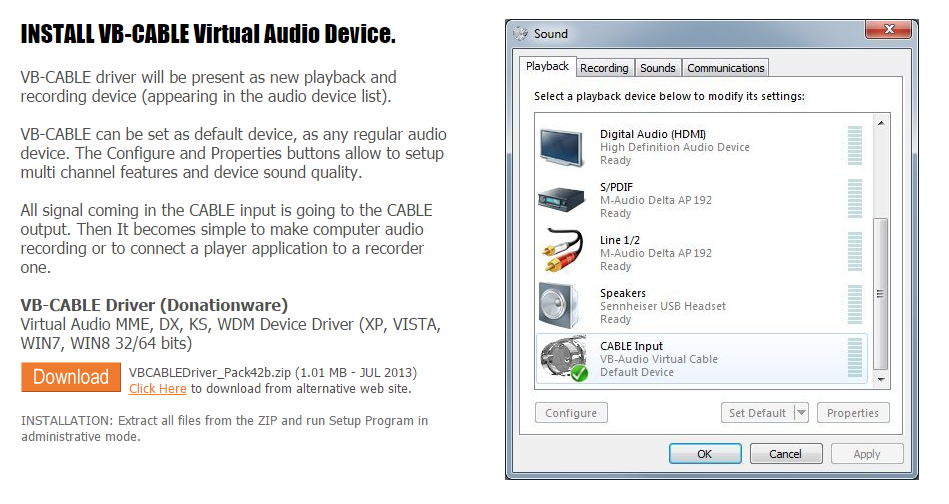
2. Set the audio cable as your default audio output device – make sure you do this whilst your controller is plugged in.
To do this, right click on the speaker icon bottom right on your taskbar. Click “Playback Devices”. Select the Virtual Audio Cable, and then click “Set Default”.
3. Set the Virtual Audio Cable up as a Live Input in your DJ software.
The following is how to do it in Virtual DJ (v8): (You should be warned that once you use
– Set up the input. Got to your audio settings, create a new audio route as below – only instead of “High Definition Audio Device”, you should select “VB Audio Cable”. Click “Apply”.It should look similar to this:
4. Enable the control of the live input in VDJ
– Set a key mapping up to enable it (or you can edit your VDJ skin to create a button but the mapping is a lot easier) – go to controllers, go to the section at the bottom. Click in the first box (Key Learn), then press the key that you want to use to enable it (it doesn’t matter which but remember if you select one on a num pad then num lock will always have to be in the same state to make it work). In the “Action” box, put “deck 1 linein on_off”. Close the editor. This will now make the key you selected enable or disable the live input for deck 1.5. You should now be able to use the effects, EQ etc. in VDJ to affect the output from anything that can play sound out of your computer.
Hopefully that works – tell us if it doesn’t (or if you use different software).
bob6397
ParticipantIt depends how the sample packs are setup – it may be that all you need to do is point the sampler in VDJ towards the correct folder and all is well.
– To use samples in VDJ (v8), go to the sampler tab bottom right (next to the sidelist/automix options).
– Right Click on the bank name, select “New Bank”.
– Use the browser to navigate to your samples as you would to find music.
– Drag the samples onto the sample slots that you want to use.You will then need to figure out yourself how you want to trigger them – IE will your controller do it? (Which controller do you have?)
bob6397
ParticipantIf you are using Traktor, then I would only recommend using Traktor (Native Instruments) controllers with it – they have the best in-built support and it is seeming likely that when the new version of Traktor comes out, it probably won’t support non-NI controllers at all.
Therefore I would recommend you get the S2 for now – similar to it’s big brother the S4 but smaller (although you need to look down the spec list and see what features you want on your next controller – this is what will effectively choose your controller for you.
bob6397
-
AuthorPosts