
Rick

Forum Replies Created
-
AuthorPosts
-
Rick
ParticipantFrosh, post: 20775, member: 1351 wrote: To my knowledge, the Built-In Soundcard is just the backup soundcard in case the the audio device fails.
No. You still use your sound card, the difference is that the ASIO drivers are used to route Traktors output to the soundcard, rather than using the normal path that windows uses. This has the effect of reducing latency and giving a better quality of audio.
ParticipantThe original post was about setting up with 2 soundcards. 1 for cueing and one for the main output. In order to have a cue / headphone mix it is necessary to have either 1 soundcard with 2 outputs or 2 soundcards each with one output.
In order for this to work you must enter the ASIO 4 all settings box
HTH
ParticipantYep…. Just checked. Its in the controller manager area of the settings. You have to select your controller and also the EQ button then you will see the option tick box at the bottom.
ParticipantNo probs! I think this feature is also in the older versions of Traktor as well.
ParticipantMaximlee, post: 20226, member: 2165 wrote: On the verge of buying reloop jockey three but there is alittle thing that worrying me that i would love some feedback on from a current user… im sure alot of people buy it so they can hook up cdjs and turntables so may not come across this problem… but i am buying for the four deck control feature, in which i see a massive flaw…
If for example i have a track playing on deck A and i have a track cued and ready for play on track B but have a idea of a bongo loop from the intro of a record that would go well with deck As record that will give extra groove and can be used to aid transition with effects etc…. so i load the track into deck C and cut the bass and highs off on the controller… so the bongos fit in the mix… all going good so far, then i flip back to deck A cau the mix is about to happen and need to swap the basses for example… well as i cut the bass and highs on the knobs when in deck C they will still be in that position… any movement and the audio will jump in volume…
now i hope that i have explained that right… but it something that is not covered in any video review or demo that i have seen… but for me its massive cau yes im only starting out… but i know what i want to be able to do and this is such any example. Of course i havent got one to test out but i would love if someone that has one could explain how it works in this situation….? i mean the only way i can see is that you do these edits with mouse in software but this defeats the point of having a four deck controller..
I’m not sure I understand exactly either but….. As I read your problem, you are concerned that you will get a big difference in sound as the Bass EQ will be in a different position in deck A than in deck C and when you move the EQ it will suddenly jump?
If this is your problem then there is a setting within TP 2 that allows a “soft takeover”. This means that if the EQ is in the 12 o’clock position for Deck C and also in the 8 o clock position for Deck A, when you switch between the two decks and turn the EQ on Deck C it will have to get to the 12 o clock position before it affects anything on deck CMay 7, 2012 at 3:48 pm in reply to: Beginner: Gemini DJ CNTRL-7 vs m-audio Torq Xponent vs Mixtrack Pro #1004090Participant35 weeks? Thought it was out in May sometime?
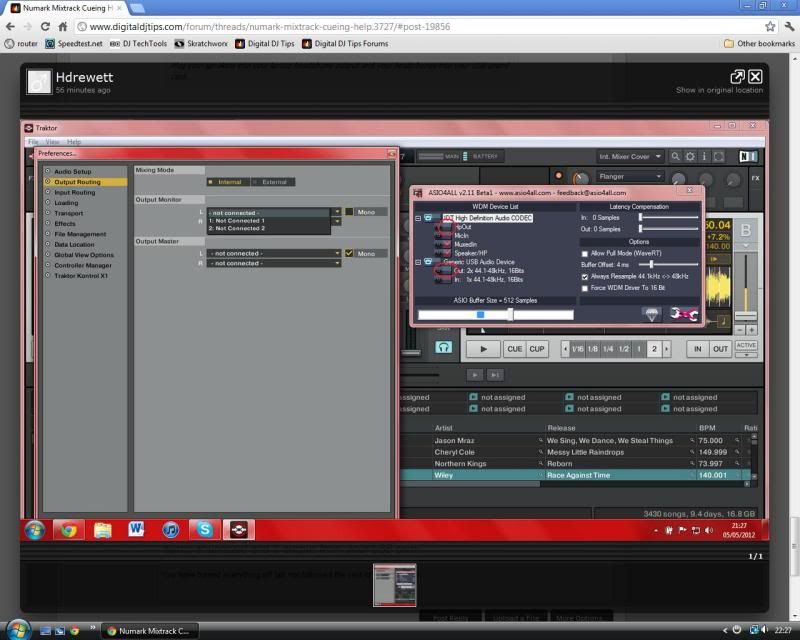
ParticipantHdrewett, post: 19858, member: 2117 wrote: Right i’ve done another print screen, i’ve turned off everything…and i’ve also tried it the ‘hpout’ and the ‘out:2x 44.1-48khz, 16 bits ticked…
but under output routing its saying nothing is connected.
i’ve also plugged my speakers and headphones into the relevant sockets so thats all sorted now too
must be nearly there now!!! thanks so much mate xx
Ha Ha. Look closely at what you have done. I said “Turn off EVERYTHING apart from the 1 output from your laptop soundcard and 1 output from your USB card.”
You have turned everything off and not followed the rest of the sentence.
I’ve circled in red what you need to turn on

 Participant
Hdrewett, post: 19855, member: 2117 wrote: Also, am i correct in having the headphones plugged into the headphone socket of the external sound card and the speakers plugged in the what looks like a microphone socket, im changing them around and plugging them into all the sockets with music playing in the background but i cant get anything.
thanks
You’re still not quite there yet.
Look at your ASIO setttings again. Turn off EVERYTHING apart from the 1 output from your laptop soundcard and 1 output from your USB card. After looking at youre screen grab you can see you still have some things selected.
Also your microphone input on your USB sound card is exactly that…. an input… you can not connect anything to it at all!!!
Plug your speakers into your laptop headphone output and your headphones into your USB sound card.
May 5, 2012 at 6:10 pm in reply to: Beginner: Gemini DJ CNTRL-7 vs m-audio Torq Xponent vs Mixtrack Pro #1004034ParticipantYousif, post: 19841, member: 2068 wrote: Show off! :p
Ha, not really! TP2 costs next to nothing now. It’s worth the investment I think.
Participant OK. Take a look at the screen grab I just did from my system.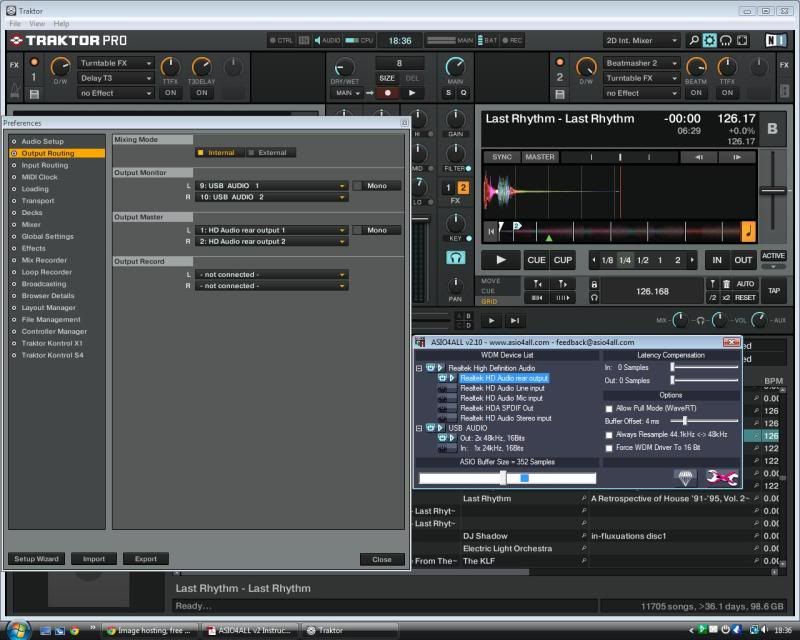
Before I got my Mixtrack Pro I tried exactly what you are trying now so hopefully I should be able to help you out!
To get your system to look like this screen grab, go into settings (in Traktor) and go to the top option (Audio set up). Ensure that ASIO4ALL is the “Audio Device”, then click on “settings” this will open your ASIO setting window. Click the spanner in the bottom right of the ASIO window to access the advanced mode.
Once that window is open select the “Output Routing” option (in Traktor).
Now, pay particular attention to the settings on the ASIO. You need to ensure that both cards are on (they should be light blue in colour when they are on).
Next you need to expand both soundcards to get into the details of what you want each sound card to do. You need to ensure that you have both cards outputting 1 source only! Turn all the other inputs / outputs off by clicking on them.
Next look back over to your settings in Traktor. “Output Monitor” should be set to USB Audio 1 and 2 as in my screen grab. “Output Master” should be set to your sound card (HD Audio rear out in my case, yours may say something different)
Now look above the ASIO4ALL window and notice the position of the knobs and button settings behind it in Traktor; they are all at the 12:00 position and the cue (blue headphones) button is also lit.
One thing to note that I discovered; Make sure that you launch Traktor before your web browser because Traktor (on my system) will not work unless my browser is off before I start it. I think this is something to do with my browser using my soundcard for playback (guess??)
Also, as I have not done this for a while before I opened my settings I got a track running so I could hear the differences as I was adjusting the settings. It may be worth you doing this as well.
HTH.
ParticipantCan you see both sound cards when you open the ASIO Devise list from the task bar?
ParticipantHave you installed the ASIO driver?
ParticipantWhat sound card do you have?
May 4, 2012 at 8:18 pm in reply to: Beginner: Gemini DJ CNTRL-7 vs m-audio Torq Xponent vs Mixtrack Pro #1004007ParticipantYeh, I’ve looked. It looks OK, but I have Traktor already so definitely won’t be swapping!
May 4, 2012 at 7:14 pm in reply to: Beginner: Gemini DJ CNTRL-7 vs m-audio Torq Xponent vs Mixtrack Pro #19704ParticipantYousif, post: 19813, member: 2068 wrote: Yes I have! I guess I’m going with Traktor then! After all, the Behringer DOES look like it’s designed for Traktor more than any other DJ software.
Btw, did you check out the latest Mixxx software? It’s awesome & it’s free which adds more to its awesomeness!
Hmmm, not sure about Mixxx to be honest. I tried a version about 3 years ago, and it was no where near Traktor.
I’ve not tried the latest version, however I think there’s a reason its free; its not quite up to the job.
-
AuthorPosts