
Hdrewett

Forum Replies Created
-
AuthorPosts
-
Hdrewett
MemberRB75, post: 19856, member: 85 wrote: You’re still not quite there yet.
Look at your ASIO setttings again. Turn off EVERYTHING apart from the 1 output from your laptop soundcard and 1 output from your USB card. After looking at youre screen grab you can see you still have some things selected.
Also your microphone input on your USB sound card is exactly that…. an input… you can not connect anything to it at all!!!
Plug your speakers into your laptop headphone output and your headphones into your USB sound card.
Right i’ve done another print screen, i’ve turned off everything…and i’ve also tried it the ‘hpout’ and the ‘out:2x 44.1-48khz, 16 bits ticked…
but under output routing its saying nothing is connected.
i’ve also plugged my speakers and headphones into the relevant sockets so thats all sorted now too
must be nearly there now!!! thanks so much mate xx
MemberAlso, am i correct in having the headphones plugged into the headphone socket of the external sound card and the speakers plugged in the what looks like a microphone socket, im changing them around and plugging them into all the sockets with music playing in the background but i cant get anything.
thanks
MemberRB75, post: 19850, member: 85 wrote: OK. Take a look at the screen grab I just did from my system.
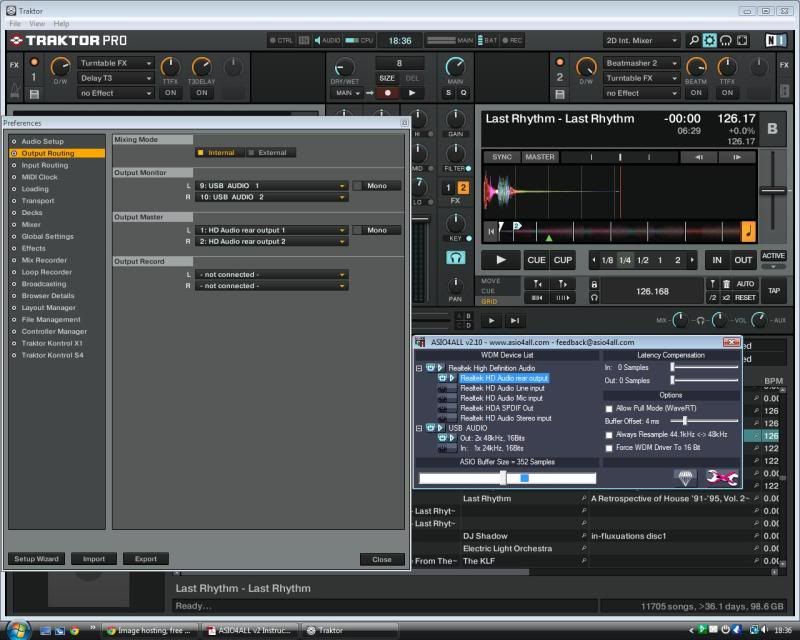
Before I got my Mixtrack Pro I tried exactly what you are trying now so hopefully I should be able to help you out!
To get your system to look like this screen grab, go into settings (in Traktor) and go to the top option (Audio set up). Ensure that ASIO4ALL is the “Audio Device”, then click on “settings” this will open your ASIO setting window. Click the spanner in the bottom right of the ASIO window to access the advanced mode.
Once that window is open select the “Output Routing” option (in Traktor).
Now, pay particular attention to the settings on the ASIO. You need to ensure that both cards are on (they should be light blue in colour when they are on).
Next you need to expand both soundcards to get into the details of what you want each sound card to do. You need to ensure that you have both cards outputting 1 source only! Turn all the other inputs / outputs off by clicking on them.
Next look back over to your settings in Traktor. “Output Monitor” should be set to USB Audio 1 and 2 as in my screen grab. “Output Master” should be set to your sound card (HD Audio rear out in my case, yours may say something different)
Now look above the ASIO4ALL window and notice the position of the knobs and button settings behind it in Traktor; they are all at the 12:00 position and the cue (blue headphones) button is also lit.
One thing to note that I discovered; Make sure that you launch Traktor before your web browser because Traktor (on my system) will not work unless my browser is off before I start it. I think this is something to do with my browser using my soundcard for playback (guess??)
Also, as I have not done this for a while before I opened my settings I got a track running so I could hear the differences as I was adjusting the settings. It may be worth you doing this as well.
HTH.
Hi,
Thanks for the help, really appreciate it.
I’ve uploaded a picture of my screen. Ive managed to turn both soundcards on, which i didnt have before,
and i’ve selected ASIO4ALL in audio setup but when i go to output routing i still only have the option to choose HPout1 and hpout2.Is there something i need to change in the asio4all settings??
thanks
MemberRB75, post: 19836, member: 85 wrote: Can you see both sound cards when you open the ASIO Devise list from the task bar?
Hi,
Thanks for your help
Yes when i open the task bar i can see 2 sound cards…
IDT high definition audio codec – which i assume is my laptop and
Generic USB audio device – the one i boughtMemberRB75, post: 19834, member: 85 wrote: Have you installed the ASIO driver?
Yes i’ve done that too.
MemberIts just a cheap £1 one that splits into a headphone and a microphone socket.
thanks
MemberFrosh, post: 19821, member: 1351 wrote: I’ve never used the Mixtrack specifically but the principle should be the same. You should have the sound card and Mixtrack connected to the laptop, the external speakers connected to the speaker output of the sound card, and the headphones connected to the headphone output of the soundcard. Then you’ll have to go into Traktor’s audio configuration menu to make sure the settings are set to your sound card and that it’s tracking the appropriate master (external speakers) and monitor (headphones) channels. This is where you may have to mess around a bit until you find the correct settings for your sound card and computer audio settings.
Hi,
thanks a lot for answering. Ok i’ve set it all up and im on traktor but when i look in the settings theres only 1 main output – hpout1 and hpout2….thats all, there should be 2 – 1 for master and one for moniter, so i dont know whats going on here?? i’ve fiddled about with it but cant seem to get anything out of it.
Thanks again.
-
AuthorPosts