Chuck Van Eekelen

Forum Replies Created
-
AuthorPosts
-
Chuck Van Eekelen
ModeratorOne I forgot is beatunes
ModeratorJogs for me are still the best way of manipulating the music, especially for manual beatmatching, but also for cueing up tracks and such. Still, there are examples of controllers which have touch strips instead of jogs (saves a lot of space after all). With your fear of inadvertently touching them … well …
Stay with the software you like/love/know well until there is a very compelling reason to switch. Not sure how big the jump to Djay Pro is, but the good news is they support a large number of controllers.
Backup, especially if you are a Djay Pro user, is simply done by adding an iPad to your collection. Get a small PA mixer like the Yamaha AG03/06 or the MG06, hook your controller and your iPad onto it (and a mic should you so desire) and if something happens, hit play on your iPad, open the fader on your PA mixer and you are in business again.
May 13, 2017 at 4:30 pm in reply to: Setup for use in combo with Ableton and live instruments – SX / Mix 8.. #2560281ModeratorI’ll leave this one for our house gury on complicated integrated musical environment, the venerable mr. Terry_42
ModeratorHi fellow Dutchie, welcome to the forums.
Frankly I hope God (if there is one) will bless all music, but that is beside the point.
Enjoy your time here on the forums.
ModeratorYou mean you are a neighbor to Tomorrowland then? Well to me also, being Dutch, but that is besides the point LOL.
Thanks for the introduction and welcome to the forums.
Enjoy your time here!
ModeratorQuick side-note: I don’t quite agree with the notion that key mixing works with whichever result from the key detection.
A wrongly detected key can clash in two ways:
1) It clashes with a track that was correctly detected in the same key (an Aminor, with an Amajor incorrectly detected as Aminor)
2) It clashes with another track that was incorrectly detected in the same key but is actually another WRONG key than the one it was detected as (two tracks both tagged as Aminor, one actually being Amajor, the other Bminor).Traktor according to the latest (2015) comparison by our friends at DJ Tech Tools, has the amazing rate of 47% correct detections. More than half are tagged incorrect! Compared to MiK7 (I don’t think the actual detection has changed in 8) which scores 87%. Still not perfect, but definitely the best in the business.
Back on topic.
Mixed in Key 8 is definitely different from it’s predecessors. I had (just to test) about 5.000 tracks in my MiK, divided over local SSD and HD and a NAS (1GB wired network connected). The MiK data was kept on the local HD. I found the indexing (search function) to be rather fast and not changed much (if at all?) from the speed with only a couple of hundred tracks in the database. It also searches by instant elimination, i.e. you start typing it drops everything that doesn’t match the search string. So no need to type the full word or title or whatever and hit search. If you type Kaja… you will probably already be left with only the tracks from Kajagoogoo. You can drag and drop right from the list. Can’t currently check how long it then takes to get the track from it’s actual location though, but that would be a function of the location and identical in any indexing software I’d assume.Again, just my thoughts.
ModeratorTodd must have been reading my mind 😀
I came away with the same thought! In this case I agree indeed. It’s always fun and a good idea to play something instantly recognizable to the folks in the crowd, yet different from the original mix.
May 9, 2017 at 2:22 pm in reply to: Vinyl Set-Up Advice: Numark TT1700 Turntables & Numark DM1100SE Mixer? #2558151ModeratorPersonally I would never start learning to DJ on vinyl. I did (a zillion years ago) and it was the hard way to go, compared to the things you can do today. Also be aware that while purchasing two TTs and a mixer may seem relatively cheap, the upkeep of vinyl is higher than with any other kind of DJ-ing. Regular vinyls are more expensive and still susceptible to damage, you’ll need new needles with some regularity and if you go DVS (i.e. using vinyl to control DJ software) you will be looking at the very least at adding a 4-in/4-out sound-card (compatible with Serato or other software you intend to use), the actual software itself (DVS usually being the most expensive version or an expensive add-on) and regular sets of control vinyls.
So unless you can safely spend the money on something that looks good to you, go ahead. If you are serious about getting into DJ-ing, buying a second-hand starter controller with some software and a good course (clearly our “How To Digital DJ Fast” course is really good 😀 ) will get you up and running in about 2 months. To me that makes much more sense.
Something I have learned about buying used gear, when that “if I don’t buy this, there will never be another something like it” moment arrives and you resist the urge to buy, suddenly you see similar offers in the weeks that follow. The point being, don’t worry about learning a bit more about DJ-ing first. If and when vinyl DJ-ing is something for you, another opportunity for gear will present itself. By then you will know what it is you want and why, so in a better place to make that decision.
My three cents as usual. Hope that helps some.
ModeratorFor sure Serato keeps it’s beat-grid info there. So if you changed a lot of beat grid info, that would be gone. Cue points is a different story. MiK can write cue points into the tags of a track. Then when imported the cue points show up. What I am not 100% sure about is if Serato then treats it as imported info and stores it in it’s own database too. Loops and other info goes into the database too I think.
You can always make a copy of said Serato folder and store it somewhere safely. Then delete the Serato folder, run a new import (or just with one or two playlists), as you import them they will be gridded.
Hopefully someone with more intimate knowledge of the Serato data in the Serato folder can shed some more light on this.
ModeratorI am sorry if it seems I am contradicting myself.
My personal preference is of little relevance to anybody, as – at the end of the day – everyone has to decide what is best for their particular situation.
We could have a nice discussion on these topics over a drink in a bar someday and we’d still end up agreeing to disagree on some things I think :-).
What I try to make my point is, that every piece of kit out there is a compromise of some sort. Either in price, features, build-quality, etx. It depends on what a person (thinks/believes he/she) needs which makes the decision happen.
For example, the XDJ-RX has indeed the extra FX section, but it offers up other things (price for example and -arguably- build quality, but definitely 2 channels) for it. Now, if you are big on FX use, the XDJ-RX will probably appeal more (although the MCX8000 allows you to stack 3 FX with their own parameters PLUS the filter which Pioneer considers and FX too). If you like cue juggling, flip, slicer and such, the MCX8000 offers 8 high-grade pads per deck as opposed to the (imho) lesser 4 on a XDJ-RX.
Another example: Denon is currently launching the Prime series. They are absolutely awesome and -to me- represent the next wave in high-end DJ gear. The feature list is very impressive, so much so that guys like Laid Back Luke, Paul Oakenfold, Tiesto and Oliver Heldens all have changed their rider. But … before the units are physically shipped to customers, over at their forums there already is a feature wish list for the next release/update/upgrade. Which only goes to show that even if you launch something really new (to CDJ users, us controller jockeys already where used to a lot of this LOL), there will be people coming up with features they “miss”. There just never will be one size fits all.
So, what might be my best recommendation to someone based on their question/situation, might not be the best for someone else. The reason we never talk about the BEST software or the BEST hardware is because there is no such thing.
Which leaves the standalone/modular versus all-in-one controller argument. I’ll stick with my conviction that media players with a regular mixer are not as feature-rich as controllers. Personally I really LIKE the form factor and have actually had a 2x SC2900/X1600 combination. It just no longer ticked all the necessary boxes having gotten used to all that controllers offer.
As for the laptop argument. I bough my first MBP for 700 euro (about 550-600 quid) and it worked perfectly. Only when I had some money I upgraded to my current i7/16GB version with 256SSD. That set me back about 800 quid, but I sold my old one for about 450. So not all that bad. That said, I played the years before that with a simple dual-core Dell business model I had picked up somewhere for next to nothing. And it did (for me!) what it needed to do. Had it hooked up to my MC6000 controller and never had a problem. And assuming most people already have a laptop, that is usually not a deciding factor.
Finally thank for your comments. Good when people keep me sharp too and make me re-evaluate what I post.
ModeratorLike I said, the mandatory playlist thing would have ended this one for me already, but if it hadn’t, this would have certainly done it.
BTW, it does show how important it is to know what to ask in advance and to ask all those things.
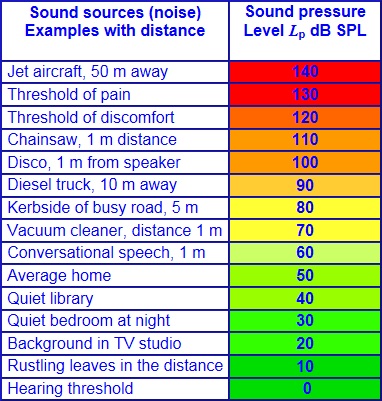
Take a look at the following chart and you can see that your max. levels will be between conversational speech at 1 meter away and a vacuum cleaner at the same distance. I can tell you from experience that a small crowd of people will EASILY produce as much as 70-80 dB when excitedly chatting. Granted, dB measurements are usually done at 10m from the source. And the good news about that is that if you halve the distance you gain 6db:
10m = 65
5m = 71
2,5m = 77
1,25m = 83dB, still not very loud, but better than 65. So those moving close to the speakers get “some” feeling of the music being played.http://www.noisemonitoringservices.com/wp-content/uploads/2013/10/Decibel-scale.jpg
Which means it is near impossible to do an actual DJ job as you are reduced to not only play like a Spotify playlist, but also at background music levels.
I am one to always push people to take any (paid) gig they can get, as there is always something to learn, but this would be a “purely for the money” thing for me.
ModeratorHi John, welcome to the forums. Enjoy your time here!
Be sure to read up on some of the posts on picking (digital) starter gear. Another tip is to take a (money-back guarantee) course like “How To Digital DJ Fast”. It will fast-track you into all things digital. Combine it with a 100-150 dollar used starter controller (plenty of posts with our list of potentials) and in 2-3 months you will fully equipped, based on that new knowledge and your experience of yesteryears, to come out and make the right decision.
Just my three cents as usual.
ModeratorFirst of all, if you have all tracks in your Traktor library, they aren’t indexed?!
Second, it’s a really curious workflow using the powers of playlists only for lists based on purchase date.
Third, we are big advocates of tight collections, so buying/adding tracks in “batches” big enough to warrant folders and playlists of their own isn’t something I am used to. I buy 5-10 tracks a month, if that. And toss out the same number that go in from my core collection (they do get moved to my “requests” collection, being a mobile DJ having too much tracks is never and issue). Knowing when I bought them is probably the last search I’d use.
All that said, it’s your workflow and if it works for you, go for it.
On-topic: In my daytime job I help companies work more efficiently. And this involves helping them come up with solutions for problems. Often this means they will enthusiastically start trying to come up with a solution for symptoms, without asking “is this really at the core of my problem”. By asking why a number of times, it’s easy to get to that core.
So the first thing I’d suggest is to figure out what is at the core of your “problem” and see if there are ways to utilize the tools that you already have to tackle that, rather than going symptom-solving by throwing (more) tools at it.
On a final, practical note: If indeed your true solution can be found in a proper tool, while not specifically made for this purpose, Mixed in Key 8 could possibly be of use to you here. You run all tracks (bulk, unattended) through the software. It will obviously give you the musical key, an energy rating, 8 Traktor cues (should you so desire) and BPM. It also has a tags tab where you can do some basic tagging stuff. It has a nice Camelot Wheel at the top, to easily find tracks in the same key. The player gives you a waveform (where you can also see, move, add/remove the cue points). The good things is, you can click on a track you found and just drag-drop it anywhere.
Clearly there are plenty of media players with some kind of indexing integrated, stuff like Media Monkey comes to mind. But MiK is aimed at DJs, offers the mentioned advantages and could easily be a relatively straightforward collection tool.
The one thing it doesn’t have is a column option for track location, this might be a bottle-neck for you. Personally I don’t care where the track is located. If, once I found it, I can drag-drop it to play it, I am happy. But that is just me.
Just my three cents worth, hope it helps some.
ModeratorI am not particularly knowledgeable about OBS per se, but in general you need to follow the routing starting with the source (or the final signal, but source is usually easier). Leave your windows default to whatever it was before, you shouldn’t need this changed for your purpose.
You said nothing about players, so I am guessing you are doing everything inside the laptop.
In that case your source is the laptop. You can set the audio output from you DJ software to correspond with channels 1-4 (setting under the input tab of the DJM utility software and in the output section of the DJ software).
At this point you would hook up speakers to the main output of the DJM and be up and running. So, this would still be the first step. Fire up the DJ software, drop tracks in all decks you intend to use and hit play on them. Set trim/gain, listen for a signal in your headphones by cueing one of the channels. Check that all switches at the top of the channels are set to USB. By turning up your mixer channel faders and master level you should now have sound over your speakers. Or you can set your headphone cue/master mix to master if you don’t want to hook up your speakers.If this works, the first part of your routing is ok. You get the sound from your DJ software to your mixer in the correct channels and can mix with it through the faders.
Now you should set rec out in the output tab of the DJM utility (which you say you have done). Effectively I would think (not sure though) that this will send the same record out (stereo) to each of the 4 available return channels. It COULD be that you get 4 different record feeds (one for each channel) but I don’t think so.
Now you should go into the OBS software and as input pick channels 1&2 from the DJM. If you are on Windows that would be an ASIO driver. Remember that record outputs are normally pre-fader (master) outputs. This means they will react to the channel fader levels, but are independent from the master settings. This is handy, cause you can turn the master up or down while listening (or answering a quick phone call) without affecting the level of your recorded mix.
So, play a track on deck 1 (corresponding with USB 1/2) and open the channel fader, again for monitoring purposes you can open the master as well, and check if you have incoming signal in OBS. Once that works, turn the channel 1 fader down and repeat for channel 2. If this also works everything is set up correctly and you should be able to play tracks in your DJ Software decks, mix them on your DJM and send out the final mix live to/through OBS.Hope that helps some.
ModeratorI will applaud you if you can find CDJ200s (let alone NXS, never mind NXS2) with a DJM900 AND a set of new monitors for anywhere near that price.
I checked our local second-hand places and you can find two players for about 2.500 euro, about 3.000 with a DJM800. If you move up to NXS, the players will be about 3.000. A DJM-900 is also a good 700-900 euro.
So unless you were talking GBP, I’ll stick with my earlier standard.
On a side-note. I am really curious what this “vibe” thing is. As said, I have been doing this for 40 years this year and have played on brand and no-brand stuff. Tried one of the first hard-disk players, the Numark D2Director. Tried simple and more extensive controllers. While I still have to sell my Pioneer DDJ-SX (gold!), I have traded (up in my opinion) to the Denon MCX8000. And quite frankly, I dare any other DJ to come and comment on the gear. The people (both audience and those in the know) that came up to me have all commented on professional-looking and “awesome” gear.
Finally, more and more “serious” DJs understand that they can do more with a controller than with a CDJ/DJM setup. It’s why big clubs like Ministry of Sound no longer expect DJs to play on their gear but expect them to bringing their own.
By the way, with the MCX8000 you could play without a laptop, or -better- have one sit off to the side. All DJs I know, that need to do more than play a (mostly) prepped set at festivals and such, will bring a laptop nowadays. Often to hook up to the CDJs, turning them into very expensive HID-controllers. It’s a most common sight in the booth.
Again, if you want modular “club-standard”-style gear, by all means go ahead. You are the one paying for and playing with it after all, not us 😀
Just, as I said earlier, make sure you do it for all the right reasons.
-
AuthorPosts