
CalVic

Forum Replies Created
-
AuthorPosts
-
CalVic
ParticipantThank you both for your replies,
Spoke to an Apple rep, and he said to me to choose the configuration I think is best and test it for a couple of days and within 14 day’s if I’m not happy I can return it to change it, or get a full refund.
So I’ll think I’ll try 13″ first 🙂
ParticipantThis is Steve Aoki we’re talking about. Named:
- Best DJ of the Year – Paper Magazine (2007)
- Best Set of the Season – Ibiza Awards (2007)
- Best Party Rocker DJ – BPM Magazine (2007)
ParticipantTerry_42, post: 41920, member: 1843 wrote: Nice. Yes stuff happens all the time. Last gig I stopped the wrong deck and made that into a “stutter” effect :O
I do that on purpose and by accident at times. I’d much rather have the frame stutter than an instant stop in vinyl mode 😉
ParticipantTerry_42, post: 41916, member: 1843 wrote: Good turnaround, so do not worry. The few crowd one could see through the phone did not mention it 😉
Thanks for sharing. Also I guess your signature is wrong, looks like you already have the DDJ-SX 🙂
Hehe 🙂 I posted it to show that it doesn’t matter how much you practice or how long you’ve been DJing, professional or no professional – shit happens 🙂 Luckily most people were just outside the tent and no one batted a eye lid.
Had my DDJ-SX since November last year, but didn’t take it. It’s a pair of CDJ800 Mark 1s and DJM 600 that were provided.
ParticipantTo be fair, the 350s and the DJM 350 aren’t too bad. They serve a purpose. Hell, I even did a set on them at a club once. It takes a while to get adjusted too – Especially if you’ve been spoiled by having the luxury to use pro grade gear as the jog wheel response and pitch fader resolution isn’t that of a CDJ 2000 or a DDJ-SX
ParticipantIf you thought the Mixtrack was huge, you should take a look at the DDJ-SX! 😀
The Mixtrack is a nice size, I think the Vestax VCI-380
and the Novation Twitch are slightly smaller due to the more squarer shape. But it all depends on your budget.
ParticipantDJ BRUAEL, post: 36864, member: 8505 wrote: I actually have a question about gain staging and redlining. Are we supposed to watch the software VU meters on the screen or the hardware VU meters on our controllers, or are they both conveying the same information?
I also don’t understand the concept of gain staging fully. What will be put me into the red the quickest? Is it increasing the master output volume, the individual gain (trim) knobs on the individual channels or something else?
I use auto-gain on ITCH but find that the red-light limiter comes on when i am not even past 50% on gains.
In the case of using software, it depends on how the software and controller interact, I know the DDJ-SX and Serato have it’s own VU Meters, but are totally independent – As well with it’s own Gain. I’d quickly just look at both.
The Gain Knob is the the biggest factor, because that single handedly will affect everything else. Your gain is like a maximum volume, Then your Channel fader has the range to that maximum volume as well as your EQ. Hence you can be playing Deck A with the fader up everything going well, and then bring Deck B up and it totally cancels out the other deck because it’s way too loud.
The Master output is the overall output, So you can have your channels gained correctly, but still redline and clip your master – Vice versa.
Below is a perfectly setup mixer (and really how it should be for everyone!) (THE 0dB RULE)
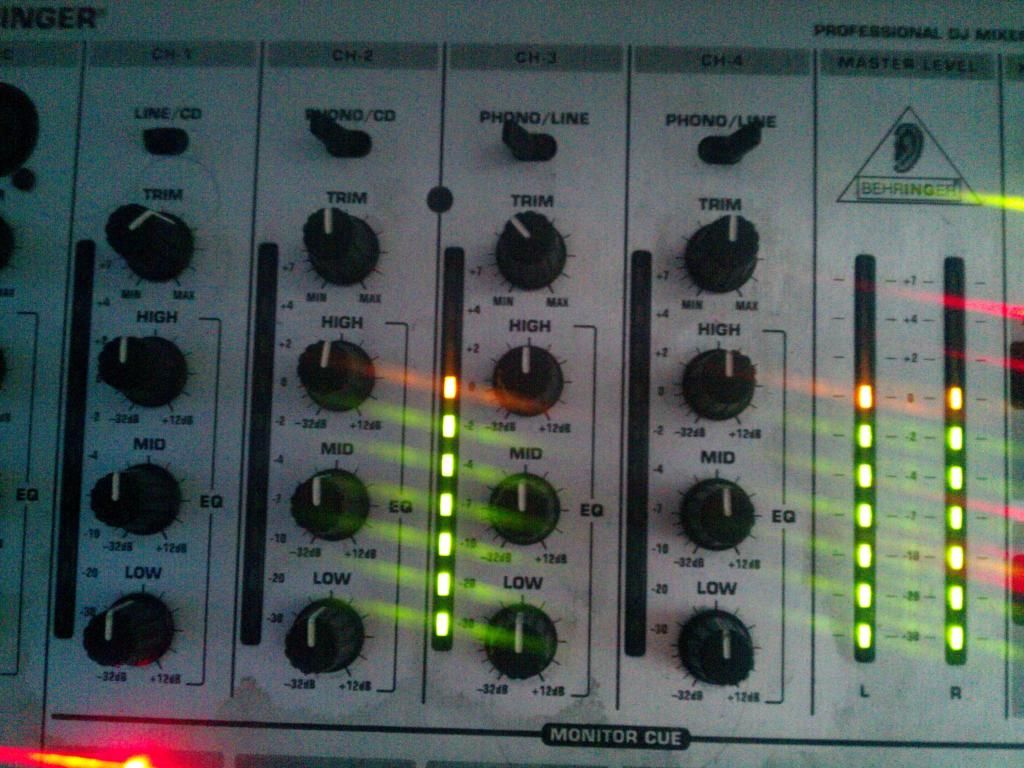
The VUs are at 1 Yellow as well as the master which is 0dB. That is the perfect set up, Your not loosing sound, and your not loosing quality because of redlining. Your getting the best you can out of the system. Pushing a nice clean signal to the amp to process to the speakers. Even though you may go double yellow or even 3 yellow. While that’s not as bad as redlining, It’s still saturating the signal a bit.
If it’s too quiet, All that’s needed is to turn up the Amp 🙂 Gain staging is really that simple. Just turning the gain knob down or up so that the peak of the track is at 1 Yellow / 0dB with the EQ knobs all centered.
and most of my gain pots are usually at either the 10PM position or 11PM. I don’t think I’ve ever had it 12 (50%) or past.
ParticipantYeah, It’s crazy.
I have a staff meeting for an event I’ll be performing at hopefully next time round as the event launch as a full line up. I’ve said to the organiser that I’ll be happy to be the sound guy for the night. The venue has been known to have blown speakers.
I’m tempted to put a sign up warning about Redlining. Probably even talk to management and have a Redlining Penalty policy, Each time you Redline you have to pay £5 – That’s one way to sort the issue 😀
I guess using a DVS is a saving grace for some, Because those who are genuinely unaware of gain staging will just leave the gain knob alone. Thus Traktor or Serato or what ever has auto gain will hopefully stop redlining, But then you get some that’ll turn up the gain because they’re stupid idiots.
Participantrfb, post: 32324, member: 2662 wrote:
Also keep in mind, that since it’s some kind of proprietary standard, you CANNOT upgrade SSD or RAM in an MBA yourself (well maybe you can, if you REALLY know what ur doing, you can solder and stuff and you’re willing to completely void any warranty). That means that for decent storage you HAVE to pay the horrendous upgrade fees of Apple.
Infact, You can upgrade the RAM and SSD Easily, and doesn’t void warranty
Instructions: http://support.apple.com/kb/HT1270
Adding memory or upgrading your hard drive are not considered “unauthorized modifications” and will not void your warranty, although the memory & hard drive, that YOU install, will not be covered.
ParticipantAgree R.Driver, and likewise, I’m at home with parents and thus I really cannot play out my music. So I’ve been mixing in headphones for years. It’s kind of odd using the monitor. But I can do both proficiently
Participanteisenhorn, post: 32822, member: 4075 wrote: thanks for this..am self teaching myself with the aid of the book ‘How To DJ (Properly): The Art And Science Of Playing Records by Frank Broughton and Bill Brewster’ and i need help using the gain dials…
thanks
Your welcome! and it’s great that your taking the time to learn gain staging! It really is just a simple process and it will make your sets sound as best as they can.
ParticipantV-MODA Faders VIP
ParticipantFilters!
I find they can be very effective, Depending on build you can drop a low pass filter or a high pass and really add to the build up for example use the low pass thus cutting out the mid and high frequencies and just before the drop hit the pause button.. wait a second or so and then drop it 😀
ParticipantFor me, The Beat Gridding is thus far the best out of all the software, Very easy to adjust for individual tracks
You need to tick the “Set Beatgrid” and also tick the “Set Auto BPM” and your BPM Range, and then the software will work out all the beatgrids for the tracks.
Hope this helps 🙂
ParticipantWell, I have to agree with the above.
The sound quality is loud and it’s proud, 24-bit depth and it’s crystal clear. My only gripe is having to sit down and mess with the effects to get the sound I want. You might want to use the HP/LP Filter in the software over the DJM style filter as you can really tune the software filter and remove that added resonance the DJM has..
But the effects are -_- being able to choose the wave, Sine, Saw, Square etc etc, It’s something you don’t want to be changing or engaging a certain effect when doing a gig without fully understanding or getting to know what does what. But they sound very high quality.
Also not fully worked out how the slicer works yet…
Moving from such a small controller to a big one, I’m having to adjust my performance, and I feel like a total noob! But that’s only because it’s a new piece of gear.
I’m super impressed!
By the way gulli, I didn’t get that email… What did they say?
-
AuthorPosts