
XLR Adapter Plug to 2 x Phono RCA Plugs
Home 2023 › Forums › Digital DJ Gear › XLR Adapter Plug to 2 x Phono RCA Plugs
- This topic has 15 replies, 6 voices, and was last updated 12 years, 2 months ago by
DJ Vintage.
-
AuthorPosts
-
January 10, 2014 at 10:06 am #1024785
Terry_42
KeymasterCheck out our PA guide here:
http://www.digitaldjtips.com/2013/04/beginners-guide-to-pa-systems-part-1-basics/
Long story short: RCA is unbalanced signal and XLR/TRS is balanced (mostly) so it is not good practice to do this even if an adapter exists and depending on what you do it will not work or make problems.
January 10, 2014 at 12:19 pm #1024802David Arthur Hora
ParticipantOk if anyone knows about the Behringer Nox606 mixer and this one has got XLR so I like to be able to put it on to the shopping list.
http://www.gak.co.uk/en/behringer-pro-mixer-nox606/47678?gclid=CK20h_S987sCFROhwgodCzwAxw
David.
January 10, 2014 at 2:29 pm #1024809Stefan Happer
ParticipantThe Behringer B215D speakers indeed have no RCA input. But they have an unbalanced TS input which you can use. You simply need one RCA-to-TS adapter for each speaker and then use a normal RCA cable to connect the controller: http://www.amazon.co.uk/HosaTech-GPR-101-inch-Adapter-Pack/dp/B000068O3S/ref=sr_1_1?ie=UTF8&qid=1389360382&sr=8-1&keywords=ts+to+rca+adapter
January 10, 2014 at 4:41 pm #1024834ParticipantI had a look at the back of the speakers and I have read this web page about Balanced wiring which I found very helpful as XLR cables are Grounded. This means that if someone has a mobile phone the signal will not get though. For anyone new like me how is the information on this link.
http://www.dplay.com/dv/balance/balance.html
So I feel a XLR cable from a mixer to the speakers will work as the Controller can be fixed to the mixer by rca plugs. I think this will work.
January 10, 2014 at 9:02 pm #1024859ParticipantIf you used the Behringer Nox606 mixer then the best option is indeed using a (balanced) XLR cable from the mixer to the speakers. And an (unbalanced) RCA cable from the controller to the mixer.
But be aware that if you use the Numark Mixtrack Quad controller you might not have much use for the Behringer mixer as you will only use one channel coming from the Mixtrax controller. Unless of course you have plans to connect also other devices to the mixer.
January 10, 2014 at 9:49 pm #1024866ParticipantYes I will as I can use a mic and of course I was going to buy CDjs for CDs as when I buy new cds and I have had a few years I can use CDs, MP3, mics and so on. I did put down I was going to use a xlr to rca and as Terry said that cable makes it unbalanced and I have read another web site to learn more and the XLR is a balanced cable as it has a ground in it to stop hum getting to the speaker. So I will go along with that as when I am a pro I can use Balanced cables from the mixed to the speakers. Plus as I have watch videos on DJing make sure a buy rolls of black tape to put over the cables.
Thanks to all that have help me and do take care.
David.
January 11, 2014 at 2:00 am #1024887Paul Craigen
Participanti use RCA to XLR male cables to connect my reloop terminal mix 4 to my behringer B412DSP speakers with no problems…..the twin adapter you linked will not work as it is 2xRCA to 1 XLR…..you need 1 RCA to 1 XLR male like this one:
you connect the red RCA output on the mixtrack quad to the right speaker and the white RCA output to the left speaker.
January 11, 2014 at 2:10 am #1024890ParticipantSo you will need 2 of the cables i linked to in my previous post.
January 11, 2014 at 10:17 am #1024914ParticipantI found some on e-mail so I can write the names down and here is the cables I will buy
<span style=”font-family: arial, Geneva, Tahoma, sans-serif; line-height: 22px; background-color: #fbfbfb;”>Numark Mixtrack Quad.with the Livewire 2 x XLR Male to 2x RCA phone 1.5 metre cable (Link> </span>http://www.ebay.co.uk/itm/Livewire-2-x-XLR-Male-to-2x-RCA-Phono-1-5-Metre-Cable-Lead-/190991083364?_trksid=p2054897.l4276<span style=”font-family: arial, Geneva, Tahoma, sans-serif; line-height: 22px; background-color: #fbfbfb;”> to goto the </span><span style=”background-color: #fbfbfb; font-family: arial, Geneva, Tahoma, sans-serif; font-size: 13px; line-height: 20px;”>550w Behringer B215D Eurolive speakers.</span><span style=”font-family: arial, Geneva, Tahoma, sans-serif; line-height: 22px; background-color: #fbfbfb;”> </span>
Thanks
David.
January 11, 2014 at 1:10 pm #1024932DJ Vintage
ModeratorYep, unbalanced to balanced is not a good idea. Running long unbalanced cables is also a really bad idea. Therefor hooking up speakers with unbalanced cables is not a good plan unless they sit really close to you and there isn’t stuff around to cause interference (be aware of light dimmer packs, they will most certainly kill your sound and can often be found in the vicinity of a DJ booth!).
Furthermore I read something about balanced being good because they are grounded. This is not the reason balanced is good. What makes balanced good is that the original signal gets “copied” to a second identical signal that is opposite in polarity (so a positive signal on one wire has a equal negative signal on the other wire). Let’s say you pick up distortion. This will change the values of the signals. but since they will affect both signals yet opposite in value, when at the end of the cable they add the signals again, the interference picked up along the way is cancelled out and only the original signal remains.
Hope that made sense.
Greetinx.
January 11, 2014 at 3:10 pm #1024946ParticipantWell that is why I am learning from people that know what they are doing as it is a lot of money just to spend then to have the gear go wrong, no thanks, I would like my gear to last so if I buy better gear I can at last keep the old gear as a stand by. At last when I am learning I can find out what to buy and save money in the long run.
Thanks to all of you that put in some input.
January 13, 2014 at 12:20 am #1025135NewportDJ Drew
ParticipantIt is possible to change balanced to unbalanced. you bridge pins 1&3 which become negative, pin 2 stays as positive. Please note that you limit your maximum cable length to 3 meters and they become prone to interference.
January 13, 2014 at 2:44 am #1025149Participantyes if you run RCA cables longer than 3 meters you will lose sound quality and run risk of interference but, if your controller only has RCA output and you don’t want to buy a mixer with XLR outputs so you can connect your speakers then run a short (1 meter) RCA to XLR, then to make cables longer just connect XLR cable to end of your short RCA – XLR cable and into speakers. That’s what i do.
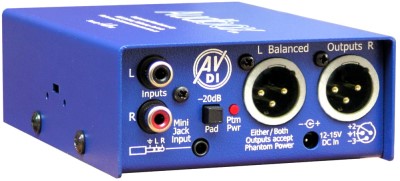
January 13, 2014 at 3:50 am #1025156ParticipantUnfortunately, the lead is still unbalanced and has the 3mt limitation. To get around this properly, a DI box needs to be utilized. This then balances the signal and is the only solution if you want longer lead runs. Note this is an active DI b(needs external power), but you can get passive DI’s (just plug and play no ext power req) as well.
Passive link &pic
http://www.proavmax.com/Whirlwind-pcDI-Direct-Box-Passive-p/whir-pcdi.htm

Active Di link & pic
http://www.arx.com.au/International/audibox-av-di.htm
 January 13, 2014 at 8:02 am #1025179Moderator
There are quite a few DI’s out there that will take a (9V block) battery too. Just make sure to use fresh batteries everytime! :-). But passive should do nicely, especially if you are not planning on doing 20m+ cable runs.
Greetinx.
-
AuthorPosts
- The forum ‘Digital DJ Gear’ is closed to new topics and replies.