
Problems with DDJ-SB
Home 2023 › Forums › Digital DJ Gear › Problems with DDJ-SB
- This topic has 10 replies, 3 voices, and was last updated 11 years, 6 months ago by
Gary.
-
AuthorPosts
-
September 17, 2014 at 9:20 pm #2059022
Terry_42
KeymasterThat is weird, I usually have this problem if the tech forgets to switch from phono level input (aka record decks) to line level inputs. Then the volume can be totally out of place. But even the Novation Twitch (one of the lowest volume controllers out there) can still give enough power to get any house mixer input to clipping levels if connected correctly.
So my guess would be that they did not flip the right switches on the house mixer for your input level and did not set their gain control correctly.
Make sure that on Serato Intro the Output setting is roughly 50-60% and your controller master output is also around 50%. You can then start cranking up the master output on the controller if it is to low until the gain on the house mixer (which also should sit at 50%) is at the clipping level. then turn it slightly down (the gain on the house mixer) and you should be fine volume wise.
This should work for ANY controller not matter what level (hell it worked even with a bloody cheap Hercules in our club).September 18, 2014 at 11:36 am #2059332Gary
ParticipantThanks Terry,
We tried a couple of different things, we tried running my controller through the club mixer, the volume of the controller and the mixer was maxed out but still nowhere near the levels of the CDJs, we then tried using a lead that meant the speakers were going directly into the controller and the same result, all levels were maxed and the output was still not near the output levels of the CDJs, you said there is an output setting on Serato Intro? I am not familiar with this where can i locate this? The gig is tomorrow night so i am running out of ideas!!!
Thanks for your help
September 18, 2014 at 11:39 am #2059342ParticipantAlso anyone have any ideas why the Numark NS6 does not connect with my Laptop?
September 18, 2014 at 12:55 pm #2059501KeymasterThe NS6 is a much older model and uses very different drivers.
I still think that somewhere in the line: Software volume control, controller gain, controller output master, house mixer input gain (SET TO LINE LEVEL!!!!), house mixer output master, poweramp input clipper, poweramp output master, optional PA limiter to finally the speaker… somewhere in that line of volume controls something is not setup right.September 18, 2014 at 1:33 pm #2059522ParticipantThanks for your response,
I was with the in-house sound engineer and he is convinced that it is the controller, i am 99.9% sure that we had it set to LINE LEVEL i will double check tonight. In the meantime do you know where i can find the software volume control on Serato Intro? I was not aware this even existed so i just want to double check this is not the issue
Thanks
September 18, 2014 at 7:33 pm #2059841John Parker
ParticipantHi just thought, I have an sx and I can enter utilities mode while disconnected from my computer and alter the volume output maybe the sb has the same feature, might be worth dl the full manual from Pioneer as I know the one that came with my controller wasn’t the full version. Good luck 🙂
September 18, 2014 at 8:02 pm #2059851ParticipantDon’t you plug in yr controller when installing intro? Might be worth installing another version with the ns6 plugged in. Or tranfer your music to your friends computer and use that with the ns6.
September 19, 2014 at 9:06 am #2060061Keymasterif you look at the screenshot of Serato Intro:
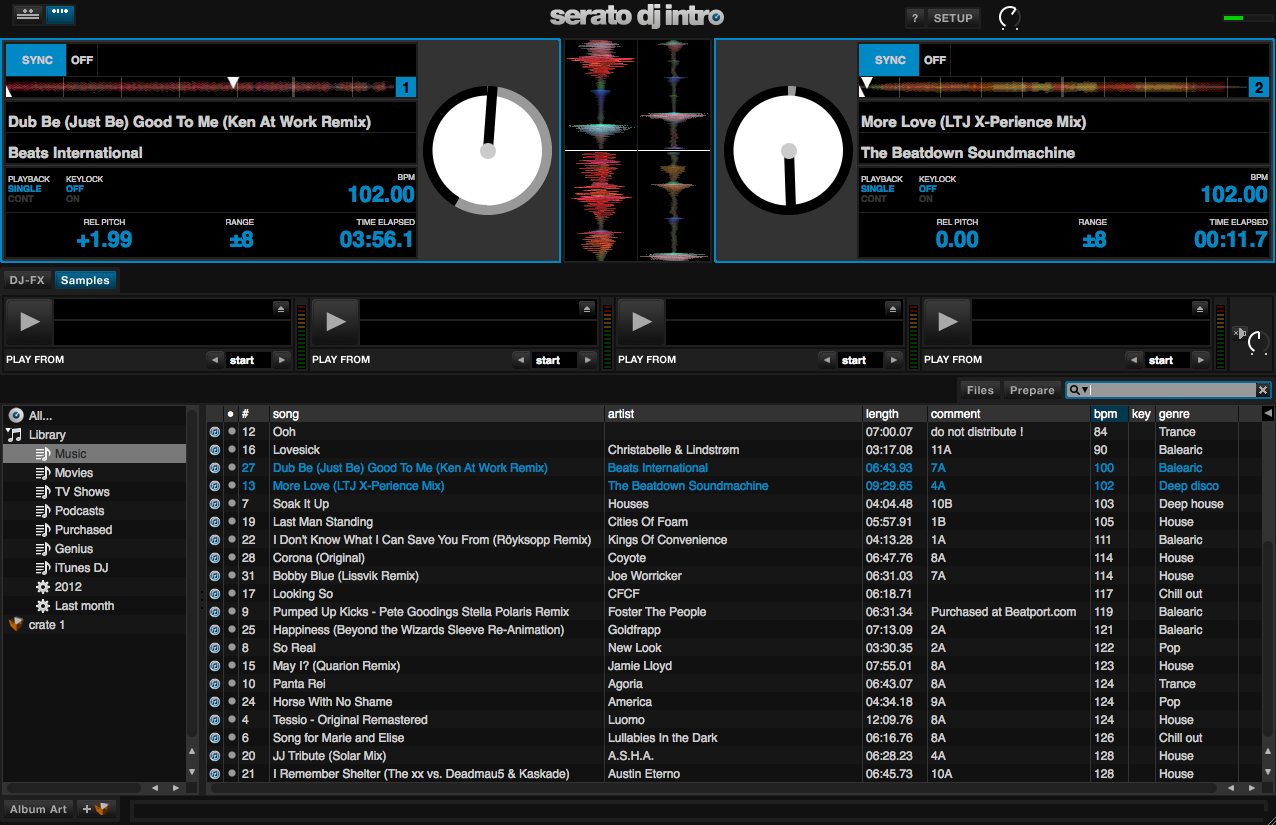
The Volume Control is in the top right, right beside the SETUP button. It has 2 small dots and a circle white-grey line. Hover your mouse over it, click and drag.
September 19, 2014 at 7:57 pm #2060221ParticipantThanks everyone for all the advice, Looks like my Serato output is set at 50% so hopefully that will make a difference if I increase this. Will give it a try before my gig tonight, I have the CDs sorted as a back-up to be on the safe side.
Thanks
PS I love this website keep up the good work!!
September 24, 2014 at 10:26 pm #2062841ParticipantWell that didn’t work, i’m completely out of ideas…had to use CD’s its not the ideal situation but it will have to do for now!!
-
AuthorPosts
- The forum ‘Digital DJ Gear’ is closed to new topics and replies.