
Launchpad
Home 2023 › Forums › Digital DJ Gear › Launchpad
- This topic has 19 replies, 4 voices, and was last updated 10 years, 10 months ago by
DJ Vintage.
-
AuthorPosts
-
May 23, 2015 at 7:34 pm #2198551
Todd Oddity
ParticipantYou’re asking more of a software question than a hardware question — but generally speaking, you’d just plug the Launchpad’s USB into another port on your computer. Sound would still come out of your SX as the Launchpad has no sound card.
Now, the real question is what software are you using and what do you want to do with the Launchpad. For example, I use Virtual and use the Launchpad as a trigger for samples and video clips. I have the output mapped to a channel on my mixer. In Virtual it’s just a matter of setting a few items in the config and tweaking the mappings how you like them.
May 24, 2015 at 12:52 pm #2198661Dj Muylle
ParticipantThat is the problem, I want to use serrate for my SX and Ableton live for my launchpad.
May 24, 2015 at 5:31 pm #2198751DJ Vintage
ModeratorSet the sound output from Ableton to one of the channels on the SX (it has 4). Then you can use that channel for your launchpad.
May 27, 2015 at 8:19 pm #2201411ParticipantI’ve tried that, but I can only send it to the master output not to a channel. And it’s easier to a channel, otherwise I can’t change the volume.
May 27, 2015 at 10:47 pm #2201471ModeratorIn Ableton, the sound card in the SX should show up as a 4 stereo channel sound card. Check which channels are NOT used in your DJ software and assign one of the free stereo channels to the ableton output. I don’t know where the “master” comes from.
May 28, 2015 at 12:32 am #2201521bob6397
ParticipantHave you installed the drivers correctly? If you haven’t (or if the wrong kind of drivers are selected in Ableton – it should be ASIO not Windows Direct Audio or equivalent) then it could show up like that?
bob6397
May 29, 2015 at 6:01 pm #2203211ParticipantBut I work on a mac
May 29, 2015 at 6:55 pm #2203221ParticipantSo you don’t need to install any drivers – fair enough.. Can you show us a screenshot of the setup in Ableton? Might be easier for us to give you tips.. 🙂
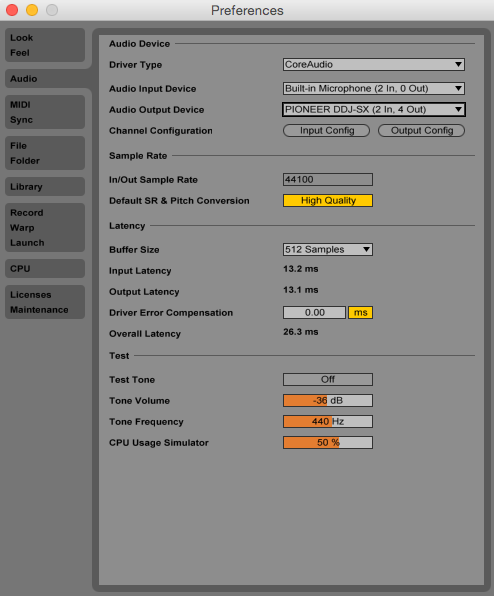
May 29, 2015 at 7:03 pm #2203251ParticipantHere I’ve uploaded 2 screenshots. One is The whole audio setup and the second one is what I can choose from to use as an output.
May 29, 2015 at 7:13 pm #2203261ParticipantCan we go back a second?
From what I see, you have 3 options to get sound out of your launchpad.
1) Send the Ableton output through the headphone port on your laptop and plug that into an analogue input on the SX. You would then have control of Ableton on that one fader on the SX. Less than ideal..
2) Send the output from ableton straight to the main output of the SX. This would mean that the only volume control (I think) would be the master volume on the SX – not ideal but it would work.
3) Use soundflower (awesome program!) to route the audio from Ableton into a “Live Input” in Serato and use one of your decks (I would suggest 3 or 4) for that purpose. This would additionally let you use all the Serato effects on the Ableton channel if you so wanted. This would probably be the easiest to setup and would just work everytime you opened it up as it routes through software. What I am not sure about is how much latency soundflower has and how to set that up in Serato.. but it can’t be too hard 🙂
What are you trying to achieve? Using on of the faders on the SX for controlling the output of Ableton? Options 1 or 3. Simply get an audio output without a volume control? Option 2.. Up to you 🙂
bob6397
May 30, 2015 at 10:48 am #2203421ParticipantSo u need to send it in ableton to Soundflower 2ch? And how can I open that in Serato?
May 30, 2015 at 2:21 pm #2203451ParticipantYes to the ableton setup.. Not sure in Serato (I’m a VDJ person..) – anyone else got a clue how to set up Live Input/Direct Input into a deck in Serato?
I could do it in VDJ/Ableton/Traktor.. Not a clue about serato though.. It should be possible.
May 30, 2015 at 11:06 pm #2203511ModeratorUnder Audio Output Device is a header name Channel Configurator, I’d like to see what that says when clicked on Output Config
May 30, 2015 at 11:25 pm #2203521ParticipantJust a load of boxes you can select Vintage.. This is mine (when set up with my Creative Soundblaster External card on ASIO)
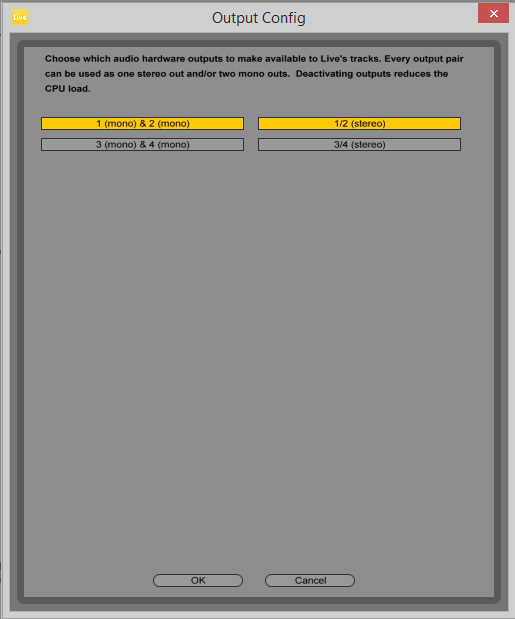
Not much use I’m afraid – just lets you select which channels the audio goes through – but since Ableton views the SX as a 4 out soundcard, I am assuming that 1-2 is master out and 3-4 is the headphone out…
bob6397
May 31, 2015 at 9:05 am #2203601ModeratorNo, ableton doesn’t “do” master out, headphone out, it’s not DJ software. It just sends your output to whatever channels you set it.
As the SX is indeed 4-out, there should be more buttons for the SX, probably labelled something like 5/6 stereo (channel 3 on the SX) and 7/8 stereo (channel 4 obviously). If you’d set either of those in Ableton and the corresponding channel on the SX to PC (front switch), then that channel would be dedicated to playing whatever output you have from Ableton without rerouting anything. You could probably even choose both channel 3 and 4 and have TWO outputs for Ableton (if this helps in some way).
Clearly you will not have any of the benefits of it being the live input for your DJ software (which is the route you were showing), but the question is if you want this at all (do you need all the FX when playing stuff from Ableton – I have no opinion either way, just saying you need to ask yourself this before chosing which way to go).
If you can do without routing the ableton signal through the DJ software and just use a single stereo channel for output, the way I described it should work.
If you do need to route through your DJ software and the software supports taking USB inputs and use them as “live” inputs on decks, then it could be prudent to have a simple stereo sound card for the Ableton master signal, run RCA-RCA from the sound card to the line in on channel 1 or 2 on the SX and set your DJ software to use that signal as “live in”. For test purposes it would work also by setting the onboard sound card to master out for Ableton, run a mini-jack to RCA into the SX channel 1 or 2. Not 100% sure about the routing. I think you can’t use the CD in on channel 3 and 4 for live input, but if that works you could even use those two channels.
So, in theory both options should work, one giving you the clean master signal from ableton that you can then run through a controller channel with EQ and fader, the other giving you the Ableton input as an extra deck in your DJ software letting you treat it like any digital file, adding FX and what have you.
-
AuthorPosts
- The forum ‘Digital DJ Gear’ is closed to new topics and replies.