
Help with traktor le and audacity please
Home 2023 › Forums › DJing Software › Help with traktor le and audacity please
- This topic has 17 replies, 1 voice, and was last updated 14 years, 9 months ago by
NewportDJ Drew.
-
AuthorPosts
-
June 26, 2011 at 8:27 pm #807
Chris Jennings
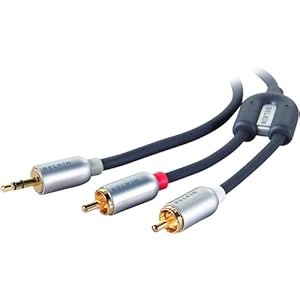
Participantthe easiest thing to do is going to be to run a line from the main out on the mixtrack to the line in on your computer. You’ll need a cable like this http://www.amazon.com/Belkin-PureAV-Miniplug-Audio-Cable/dp/product-description/B00024VU5I
 June 26, 2011 at 8:40 pm #810
stu2110
MemberThanks for the reply. Iv got a cable to do this but i still get nothing? Iv even got another cable as i thought it might have been a damaged cable. But once again still nothing. Very frustrating
June 26, 2011 at 8:51 pm #814Phil Morse
KeymasterProb sound card settings/software Have you set the Audacity input to record from your computer’s line-in?
June 26, 2011 at 9:17 pm #833MemberCurrently my audacity preferences are ;
playback
Device – speakers (realtek high def)
recording
Device – microphone (realtek high def)
Channels – 1 (mono)Alls i get when i press record is a continuous horizontal line
June 26, 2011 at 11:03 pm #853ParticipantYou need to set that recording device to built-in input
June 27, 2011 at 8:46 pm #1115MemberOk now iv changed the recording device to microsoft sound mapper -input. Is this correct? I now get a error message saying “error while opening sound device. Please check the input device settings and the project sample rate” still really stick and feel such an idiot! Thanks for trying to help. Any idea of what i do now?
June 27, 2011 at 9:25 pm #1000482ParticipantI’m not sure of the differences between mac and pc versions of Audacity, but I have a drop down for input and output just under the file menues. Do you not have an option that says built in input? Maybe if you could post a screenshot of your options available it would help.
June 27, 2011 at 9:35 pm #1125MemberIv now got it to record whats playing 🙂 but…… Theres massive distortion (not sure of the spelling of that ha) so im half way there. Just need to figure out how to get much better sound. As its really bad?
June 27, 2011 at 10:09 pm #1000484ParticipantCheck your volume levels both in Traktor and in Audacity. Make sure none io your meters go into the red.
June 27, 2011 at 10:31 pm #1138Emma Partnow
MemberI don’t know How to Quote a Person on this Forum;
But; if you are still getting Distortion Stu; check which Soundcard you are using;
When I use my Built In soundcard with Traktor I get Massive Distortion; however; when I change it to my ASIO Driver the Distortion disappears immediatelyJune 27, 2011 at 10:38 pm #1000486ParticipantEmma Partnow, post: 1127 wrote: I don’t know How to Quote a Person on this Forum;
But; if you are still getting Distortion Stu; check which Soundcard you are using;
When I use my Built In soundcard with Traktor I get Massive Distortion; however; when I change it to my ASIO Driver the Distortion disappears immediatelyIf you click the reply in a specific post it will put that post in quotes.
Using Asio drivers is always a good decision in my book.
June 27, 2011 at 10:49 pm #1000489MemberChris Jennings, post: 1132 wrote: If you click the reply in a specific post it will put that post in quotes.
Using Asio drivers is always a good decision in my book.
AHA !!!
Thank You Chris :); you are a Diamond 🙂June 29, 2011 at 11:34 pm #1780NewportDJ Drew
Participantneed to know what operating system you are using then i can probably help with a click list. I’m confident if you use windows l can show you how to adjust levels (just tell which one, xp visto or 7). If you use on board sound then theres an unfortunatly good chance ASIO drivers probably wont be compatible… or even written for it. however your mixer is a sound card in it’s own right and most likely supports ASIO (which stands for Audio Stream Input Output)- but that is not what is recording your mix… your in board sound card is. Now, Having said all that you may have some or no luck with an ASIO4ALL driver.
June 30, 2011 at 7:15 am #1000669MemberIm running on windows 7. Got traktor le, numark mixtrack pro, 1 year old samung laptop not sure on the spec for it but i can let you no once im home from work if you need to no that aswell? Cheers for trying to help everyone. Its a pain in the arse! I can get it to record but the quailty is very very poor and it only records my tracks that are being cued up (basicly only what i can hear through my head phones) apart from audacity everything is set is fine and works great
Cheers
StuJune 30, 2011 at 11:42 am #1967Participantokay near the clock… click the little arrow. single click the white speaker single click the word mixer. single click the icon system sounds. click the recording ‘tab’ in the new window that opens. highlight the ‘line in’ spot. (single click) then hit properties button. (down towards bottom right hand side of the window). This will open a new window. hit the levels tab.(top of the window) then adjust the level from here. set it pretty low. (no more than third) then your done hit apply, and work your way back out of where you are.done. hope this has achieved your goal!!!
NOTE:you may have to ‘tweak’ the level until find the sweet spot. but at least you know where it is now! -
AuthorPosts
- The forum ‘DJing Software’ is closed to new topics and replies.