
Considering Ableton for DJing
Home 2023 › Forums › DJing Software › Considering Ableton for DJing
- This topic has 59 replies, 1 voice, and was last updated 14 years, 7 months ago by
Emma Partnow.
-
AuthorPosts
-
August 1, 2011 at 6:39 pm #5023
U31
MemberAgreed, Traktor’s beatgrid system is why i went back to Virtual dj, where i use me lug holes and jog wheel nudges to keep tracks in beat..
Got to say i’m loving Ableton, even tho at the very first it appeared to be everything i despise about traktor, but with knobs on..The warping soon becomes intuitive, with only a few tracks throwing curve balls so farAugust 2, 2011 at 2:26 pm #5055Emma Partnow
MemberAs it seems I didn’t ‘Complete’ my Tutorial the other night; I will do so now:
We have an ‘Area’ within Our First Track (sitting on ‘1 Audio’ that needs to be Deleted);
In Order to Do This; we Need to ‘Split The Track’ and then Delete ‘That Part That Is ‘Not Required’
Before we do this Our Screen looks like this: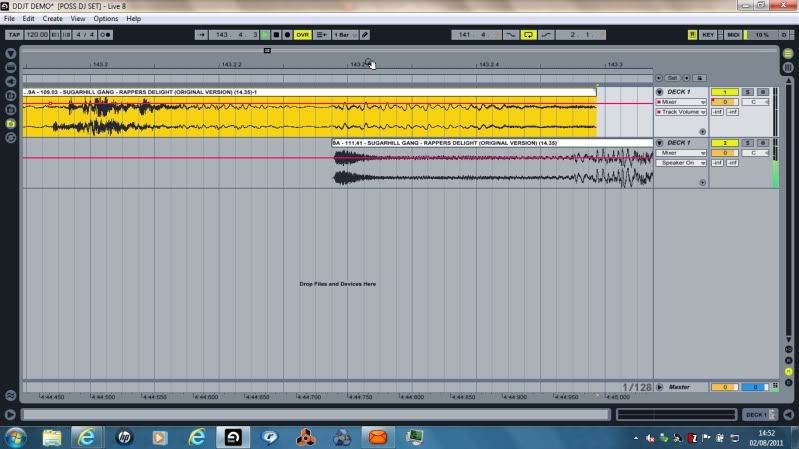
We ‘Expand Our Resolution’ and Find the ‘Exact Grid Position’ where we Need to ‘Split the Track’:
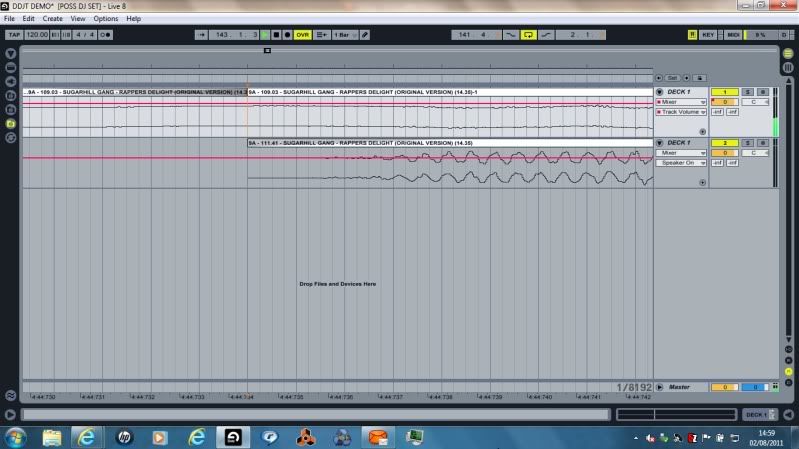
We then ‘Delete’ the Area To The Right Of The Split; as this Area will be ‘Filled’ with our Track sitting in ‘2 Audio’
We do this by ‘Left Clicking’ Once on the Track (that has been Split – to the Right Of The Split); so that it is Highlighted in Yellow; we then ‘Right Click’ this Part Of Track ‘1 Audio’; and Select ‘Delete’: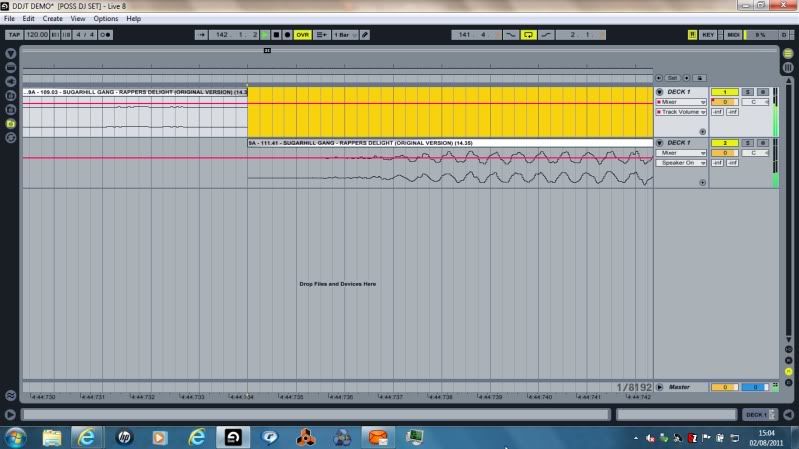
And Finally; at the ‘Same Resolution’; Our Final Step is to ‘Move’ the ‘Ending Of Our Track’ sitting within ‘2 Audio’ into ‘1 Audio’; we do this ‘Simply’ by ‘Left Clicking’ Once on the Track we wish To Move; so that it is Highlighted in Yellow;
And we ‘Drag’ this Track into the ‘Space’ Vacated by ‘Deleting The End Of The Track’ that ‘Was’ sitting on ‘1 Audio’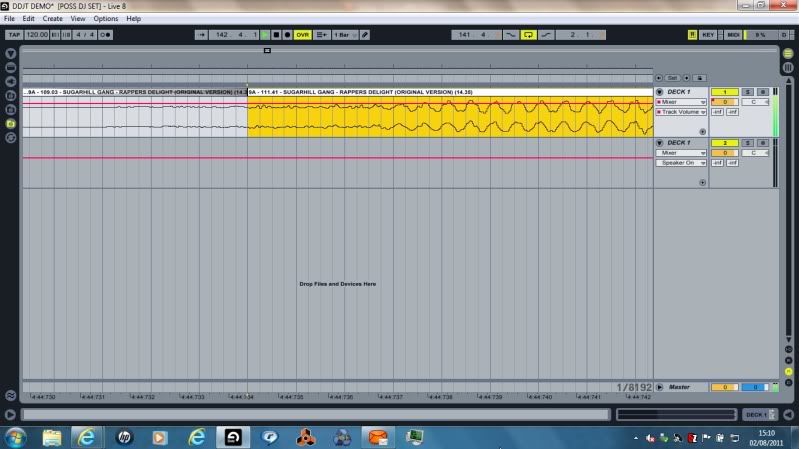
Our Last Step is to ‘Zoom Out’ and ‘Join The 3 Pieces Of Our Track Together’ using an Action called ‘Consolidate’;
We do this by following these Simple Steps;
1: Left Click Once on the ‘First Part Of The Track’
2: ‘Hold Shift’ and ‘Left Click’ Once on the ‘Final (Third) Part Of The Track’
This will make ‘All 3 Parts Of The Track’ Highlighted in Yellow
Once this has happened we can ‘Release The Shift Button’
‘Right Click’ Once on the ‘Final Part Of The Track’ and Select ‘Consolidate’
You will now Notice that Ableton Re-Scans the Track; and ‘Stitches All Parts Of The Track Together’
So; you end up with a Screen that looks like this: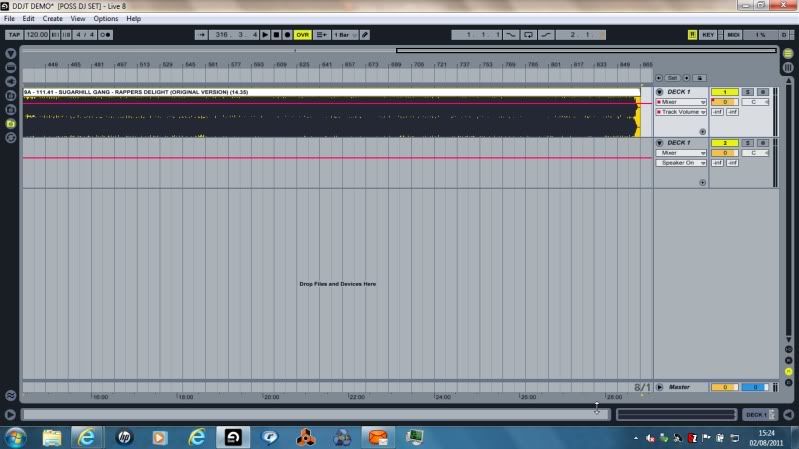
And that is ‘One’ Way of Achieving a DJ Edit in Ableton 🙂
August 2, 2011 at 4:26 pm #1001260MemberSweet, Emma, its great of you to spend your time helping, it is VERY much appreciated!
August 10, 2011 at 4:00 pm #5563DaRat
MemberHi emma, i just found this website and its very good. I came from DJ Tech Tools. Do you have an email address that i can ask you some questions about Ableton? I’m tossing up Ableton, S4, or the new twtich. But i haven always wanted to work with Ableton. Hope to hear from you!!
August 10, 2011 at 11:31 pm #5591MemberDaRat, post: 5558 wrote: Hi emma, i just found this website and its very good. I came from DJ Tech Tools. Do you have an email address that i can ask you some questions about Ableton? I’m tossing up Ableton, S4, or the new twtich. But i haven always wanted to work with Ableton. Hope to hear from you!!
Thank You for your Enquiry;
I have sent you my Email Address so you can ask Any Questions regarding Ableton 🙂August 11, 2011 at 6:38 am #1001377Andrea Negri
MemberEmma! you are the Ableton’s Master!
It will take weeks to carefully read your posts…it’s all very interesting stuff.August 11, 2011 at 1:34 pm #5632MemberAndrea Negri, post: 5605 wrote: Emma! you are the Ableton’s Master!
It will take weeks to carefully read your posts…it’s all very interesting stuff.Thank You Andrea 🙂
It was your Original Post some time ago that gave me the Confidence to Share some of my Knowledge 🙂
If you have any Particular Questions just let me know 😎August 11, 2011 at 4:53 pm #5652MemberI’m studying hard on warping process and clips preparation…
August 11, 2011 at 5:17 pm #5654MemberAndrea Negri, post: 5647 wrote: I’m studying hard on warping process and clips preparation…
I Hope there is Something for you in the Above Screenshot Posts to Help you with this 🙂
But Your Confidence Will ‘Soar’ if you just set yourself to Complete a 15-30 Minute Set;
So; a Suggestion from me at this Stage; would be to Place ‘Just One’ Warp Marker at the Beginning of Each Track;
Use say 4-10 Tracks of the ‘Same BPM’; and Complete this Short Set using the Method of Mixing ‘In & Out’ on the Last 16 Bars of the Track; in this way (though you are Likely to be ‘Far Ahead’ of this Procedure on other Equipment); you will ‘Feel Comfortable; Satisfied; and Successful’ Within the Ableton Environment; and then Feel Able to Move On to ‘More Challenging Tasks’ :);
But I have All The Time In The World to Walk You Through ‘Any Process’ you may need Further Instruction On 😎August 12, 2011 at 9:53 am #5702Memberok, but using Ableton for mixing in a “normal” way is not the way I want to go…because I use also VDJ and TP2.
With Live I want to be more creative and create something “special” (aka live-remix).
BTW, Thanks a lot Emma!August 12, 2011 at 10:26 am #5704MemberBut once you learn to control Ableton for “Live” DJ sets it becomes natural..
And understanding Ableton a little better has had a knock on effect of understanding Traktor a little better too for some strange reason!August 12, 2011 at 6:42 pm #5741MemberAndrea Negri, post: 5697 wrote: ok, but using Ableton for mixing in a “normal” way is not the way I want to go…because I use also VDJ and TP2.
With Live I want to be more creative and create something “special” (aka live-remix).
BTW, Thanks a lot Emma!That’s Cool; I use Ableton to Create Remixes too; and also to Produce my Own Tracks from Scratch;
If you would like any Assistance with what you are doing; there isn’t really Anything I don’t know about the Program now; but that is up to you of course 🙂August 16, 2011 at 3:42 am #5862pilotmike327
MemberGood news: Turns out getting my Macbook fixed will be considerably cheaper than I thought it was going to cost. I’ll be getting it back when I return from the Dominican Republic. That’s means I’ll be able to install Ableton again on it! I’ll be using it as a production tool more than a DJing tool but will try to keep an open mind when it comes to the software.
August 16, 2011 at 1:22 pm #5883Memberpilotmike327, post: 5857 wrote: Good news: Turns out getting my Macbook fixed will be considerably cheaper than I thought it was going to cost. I’ll be getting it back when I return from the Dominican Republic. That’s means I’ll be able to install Ableton again on it! I’ll be using it as a production tool more than a DJing tool but will try to keep an open mind when it comes to the software.
This is Great News Mike 😎
Having Completed a 12 Month Music Technology Course using Logic; and been using Reason since Version 2;
I haven’t found a Better; More Organised; User Friendly DAW; than Ableton for Production 🙂
And just to make it Clear; I May use Ableton for DJ’ing (as Does Sasha; Richie Hawtin; Armin Van Buuren; DJ Jazzy Jeff; Darren Price; John Digweed; Kaskade; and others); I also use Ableton for my Production and Remix Work; On My Own; and Whilst Collaborating with Other Artists All Over The World; from Europe to the USA to Alaska 🙂 -
AuthorPosts
- The forum ‘DJing Software’ is closed to new topics and replies.