The only way I could think of doing this would be to use a Virtual Audio Cable in your computer, and then send that through a live input option on your DJ software.
Couple of questions – Which software do you use? and Are you on a PC or a Mac?
I’m going to answer for PC here – it only varies slightly for a mac.
1. Download and install “VB-CABLE Virtual Audio Device” from here: http://vb-audio.pagesperso-orange.fr/Cable/
(What this does is let you route audio out of a web browser/media player into your DJ software)
Make sure that it this one that you download – there are several on that page:
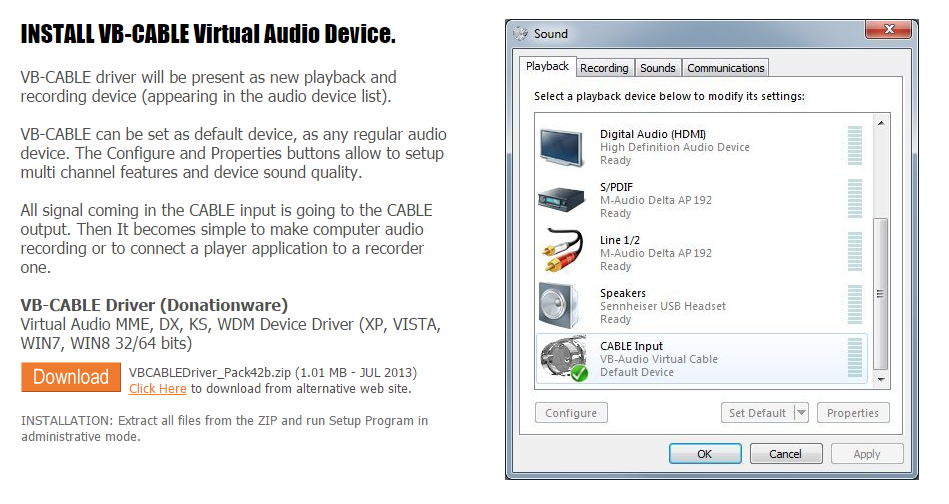
2. Set the audio cable as your default audio output device – make sure you do this whilst your controller is plugged in.
To do this, right click on the speaker icon bottom right on your taskbar. Click “Playback Devices”. Select the Virtual Audio Cable, and then click “Set Default”.
3. Set the Virtual Audio Cable up as a Live Input in your DJ software.
The following is how to do it in Virtual DJ (v8): (You should be warned that once you use
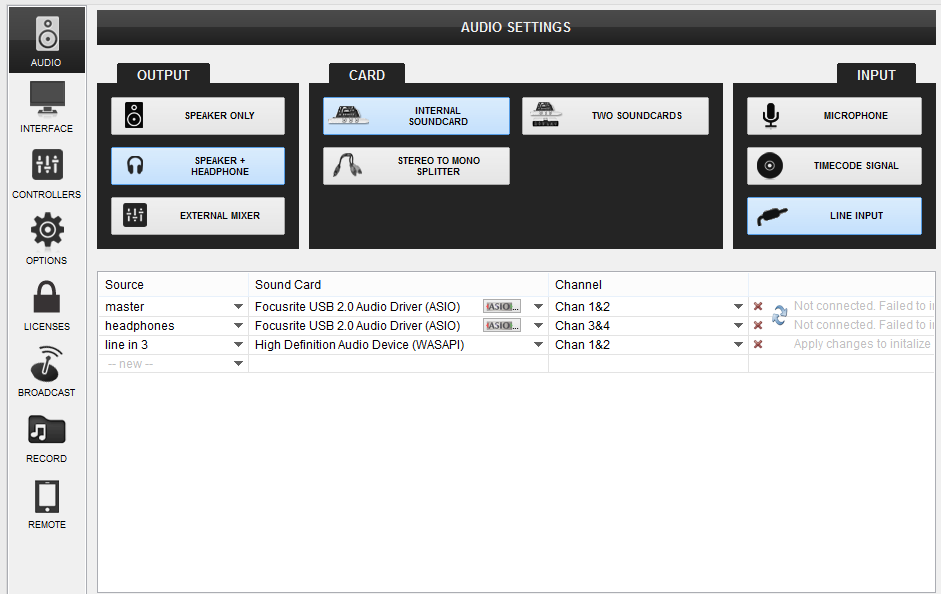
– Set up the input. Got to your audio settings, create a new audio route as below – only instead of “High Definition Audio Device”, you should select “VB Audio Cable”. Click “Apply”.
It should look similar to this:
4. Enable the control of the live input in VDJ
– Set a key mapping up to enable it (or you can edit your VDJ skin to create a button but the mapping is a lot easier) – go to controllers, go to the section at the bottom. Click in the first box (Key Learn), then press the key that you want to use to enable it (it doesn’t matter which but remember if you select one on a num pad then num lock will always have to be in the same state to make it work). In the “Action” box, put “deck 1 linein on_off”. Close the editor. This will now make the key you selected enable or disable the live input for deck 1.
5. You should now be able to use the effects, EQ etc. in VDJ to affect the output from anything that can play sound out of your computer.
Hopefully that works – tell us if it doesn’t (or if you use different software).
bob6397

.

