
Redlining DJ's Rant.
Learn To DJ With Digital DJ Tips › Forums › The DJ Booth › Redlining DJ's Rant.
- This topic has 10 replies, 1 voice, and was last updated 13 years, 7 months ago by
Daryl Northrop.
-
AuthorPosts
-
February 13, 2013 at 12:20 pm #36678
softcore
MemberAmen!
February 13, 2013 at 4:59 pm #36691DJ Menno
ParticipantI stay out of the red as much as I can, completely agree. Although I like the big sound peaks to be slightly in the red, just to make sure my sound has enough “texture” to it.
February 13, 2013 at 6:31 pm #36697D-Jam
ParticipantI think too many have a rockstar mentality thinking that being in the red makes you a “rebel” or “renegade”. It just makes you sound terrible.
I usually roll my eyes when I walk into a booth and someone tells me you can’t raise the volume sliders past 2…but the gains and the amp are cranked up way too high. Dear lord help me.
February 13, 2013 at 6:41 pm #36698CalVic
ParticipantYeah, It’s crazy.
I have a staff meeting for an event I’ll be performing at hopefully next time round as the event launch as a full line up. I’ve said to the organiser that I’ll be happy to be the sound guy for the night. The venue has been known to have blown speakers.
I’m tempted to put a sign up warning about Redlining. Probably even talk to management and have a Redlining Penalty policy, Each time you Redline you have to pay £5 – That’s one way to sort the issue 😀
I guess using a DVS is a saving grace for some, Because those who are genuinely unaware of gain staging will just leave the gain knob alone. Thus Traktor or Serato or what ever has auto gain will hopefully stop redlining, But then you get some that’ll turn up the gain because they’re stupid idiots.
February 13, 2013 at 10:25 pm #36705DJ Contour
ParticipantIf anything sometimes when I am playing out I will keep my VUs on check according to time intervals for how long I am playing. Usually using my own PA System I fear damaging them just as much as I want my Mix to have good Quality, so I progressively increase the Gain and Volume in Peaks that occur throughout my Mix. I often find myself dropped my volumes back down after a peak to give my PA a break and to reestablish some control over what I sound like !
February 13, 2013 at 11:12 pm #36708DJ BRUAEL
ParticipantI actually have a question about gain staging and redlining. Are we supposed to watch the software VU meters on the screen or the hardware VU meters on our controllers, or are they both conveying the same information?
I also don’t understand the concept of gain staging fully. What will be put me into the red the quickest? Is it increasing the master output volume, the individual gain (trim) knobs on the individual channels or something else?
I use auto-gain on ITCH but find that the red-light limiter comes on when i am not even past 50% on gains.
February 14, 2013 at 7:16 am #36716Stavros Spartalis
ParticipantAs a kid i was using my dads separates hifi in order to record mixtapes. Not djing mixtapes, but more like various artists with maybe four seconds overlapping at the end. that thing had a single casette recorder with VU meters. analogue needles. and the very first thing my dad (electronics engineer) told me was: “have it high enough so it touches the beginning of the “red bit” momentarily but doesnt stay there”. Never questioned it then but been doing it ever since.
February 14, 2013 at 8:49 am #36723ParticipantDJ BRUAEL, post: 36864, member: 8505 wrote: I actually have a question about gain staging and redlining. Are we supposed to watch the software VU meters on the screen or the hardware VU meters on our controllers, or are they both conveying the same information?
I also don’t understand the concept of gain staging fully. What will be put me into the red the quickest? Is it increasing the master output volume, the individual gain (trim) knobs on the individual channels or something else?
I use auto-gain on ITCH but find that the red-light limiter comes on when i am not even past 50% on gains.
In the case of using software, it depends on how the software and controller interact, I know the DDJ-SX and Serato have it’s own VU Meters, but are totally independent – As well with it’s own Gain. I’d quickly just look at both.
The Gain Knob is the the biggest factor, because that single handedly will affect everything else. Your gain is like a maximum volume, Then your Channel fader has the range to that maximum volume as well as your EQ. Hence you can be playing Deck A with the fader up everything going well, and then bring Deck B up and it totally cancels out the other deck because it’s way too loud.
The Master output is the overall output, So you can have your channels gained correctly, but still redline and clip your master – Vice versa.
Below is a perfectly setup mixer (and really how it should be for everyone!) (THE 0dB RULE)
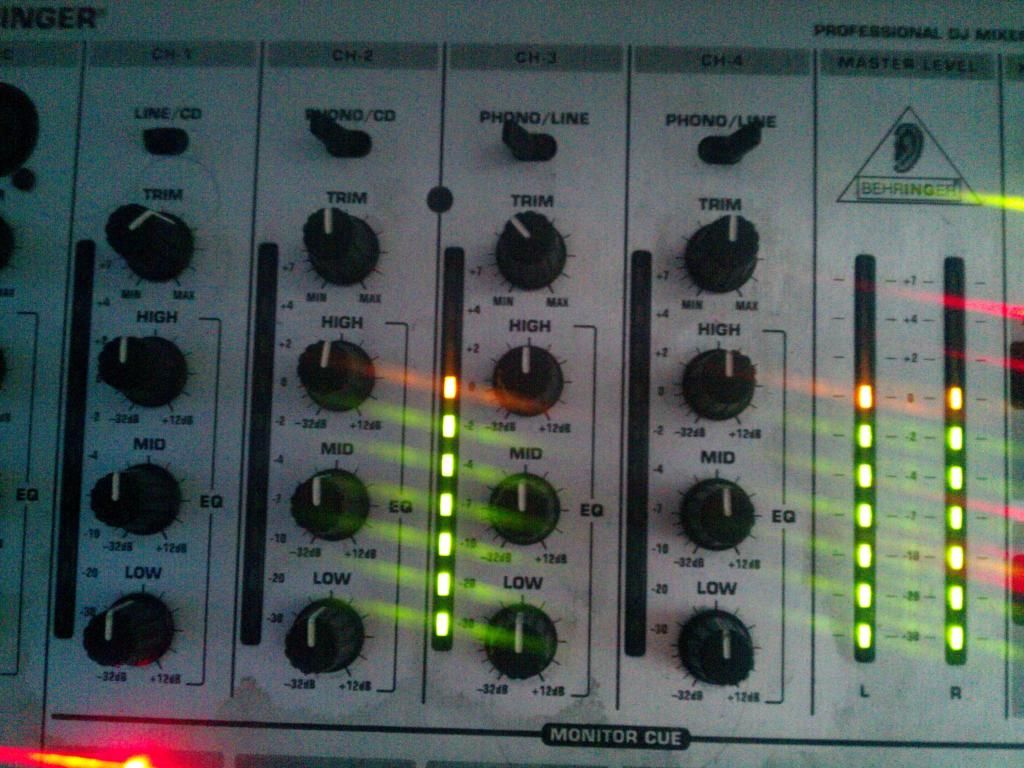
The VUs are at 1 Yellow as well as the master which is 0dB. That is the perfect set up, Your not loosing sound, and your not loosing quality because of redlining. Your getting the best you can out of the system. Pushing a nice clean signal to the amp to process to the speakers. Even though you may go double yellow or even 3 yellow. While that’s not as bad as redlining, It’s still saturating the signal a bit.
If it’s too quiet, All that’s needed is to turn up the Amp 🙂 Gain staging is really that simple. Just turning the gain knob down or up so that the peak of the track is at 1 Yellow / 0dB with the EQ knobs all centered.
and most of my gain pots are usually at either the 10PM position or 11PM. I don’t think I’ve ever had it 12 (50%) or past.
February 14, 2013 at 10:30 am #36725Lj Stevens
ParticipantBut can I just add its only 0db in analogue world, it should be -18db if you are using a digital mixer! But once again the LED’s meters should just be touching the red!
February 19, 2013 at 2:58 am #36898Daryl Northrop
ParticipantWorking with your sound guy at the venue is important too. Respect the venue and their equipment – get there ahead of time to do a soundcheck if possible and set your volume levels accordingly.
-
AuthorPosts
- The forum ‘The DJ Booth’ is closed to new topics and replies.