Home 2023 Forums DJing Software problem with library copy

Viewing 15 posts - 1 through 15 (of 15 total)
  • Author
    Posts
  • #2197501
    Terry_42
    Keymaster

    did you also move your music files? sounds to me you only copied your playlists but not the files.

    #2197521
    Tim Vandamme
    Participant

    yes, the music files are ok
    my itunes works perfect
    that’s the strange on it,

    #2198041
    Terry_42
    Keymaster

    Hmm that sounds very strange because here is what I just did:
    Old MacBook had Files in Music folder and all playlists in iTunes. I use Serato.

    1. Copy all Music from old MacBook to new (non-restored) MacBook’s Music folder via normal copy
    2. Export Library from old iTunes as xml file
    3. Import xml file into new iTunes -> works
    4. Copy old Serato DB to folder on new MacBook

    Works perfectly, even all my cue points etc. are there since I copied the Serato DB over…
    I cannot find what you did do differently?
    Oh and I just checked in djay Pro it also works fine. I have no VDJ installed at this time.

    #2198081
    Tim Vandamme
    Participant

    hello,

    point 3: import xml file:
    I did it manually, so i went to my itunes folder en overwrite the exiting xlm file

    as you write it, I think you can import it in itunes?
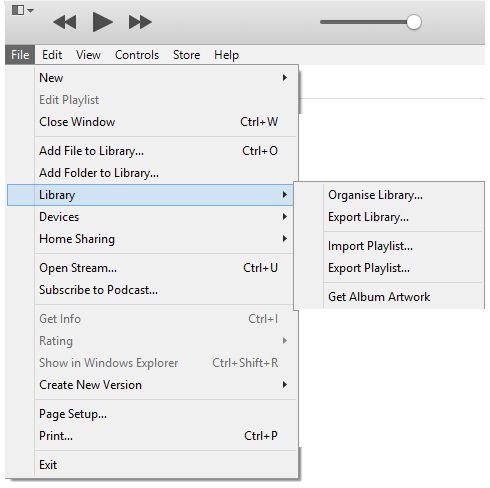
    if you go to library, you can import one playlist, but no complete library?
    i have the options: export library, import playlist and export playlist
    so to import my new library, i overwrote the itunes files…

    strange that i doesn’t work anymore (it worked earlier)

    #2198231
    bob6397
    Participant

    To import a library, simply open up iTunes whilst holding down the right key (Option for Mac, Shift for Windows) and then click “Choose Library”. That should work..

    bob6397

    #2199331
    Terry_42
    Keymaster

    Nah in the File menu in iTunes there is an import library function.

    #2199751
    bob6397
    Participant

    Erm… Terry?

    #2200401
    Terry_42
    Keymaster

    Export your Library with the Export Library function as in above screenshot.

    Then You click on “import Playlist” and then select the whole Library.xml
    It then will take ages (took around 5min for my huge playlists) to import them and iTunes will seem that it will have crashed… just leave it be.
    Then all your playlists will be there…

    #2201391
    Danny P
    Participant

    Did you copy over the Virtual DJ database file?

    #2201501
    Tim Vandamme
    Participant

    no, it is not necessary,
    I play form my itunes bib
    when I opened my virtual for the first time on all my Macs, the itunes list is there en just works.
    now I see my list, but de files won’t play,
    i never copied a database file from virtual dj, neither on the other (well working) macs,

    #2201531
    bob6397
    Participant

    Will the files play through iTunes?

    If they do, and it still doesn’t work in VDJ, close it, go to “Documents” -> “Virtual DJ” and try changing “database.xml” to another file name (e.g. “database2.xml) and the same for “settings.xml” and then re-launching VDJ.

    That should reset the database and the settings, letting you view everything as if it is a new install of VDJ. Then see if it works..

    bob6397

    #2201861
    Tim Vandamme
    Participant

    hello

    itunes is ok,
    the songs are playing there. that’s allright
    the problem mac is a clear installation, so there is no database and settings in virtual dj to start with

    #2202221
    bob6397
    Participant

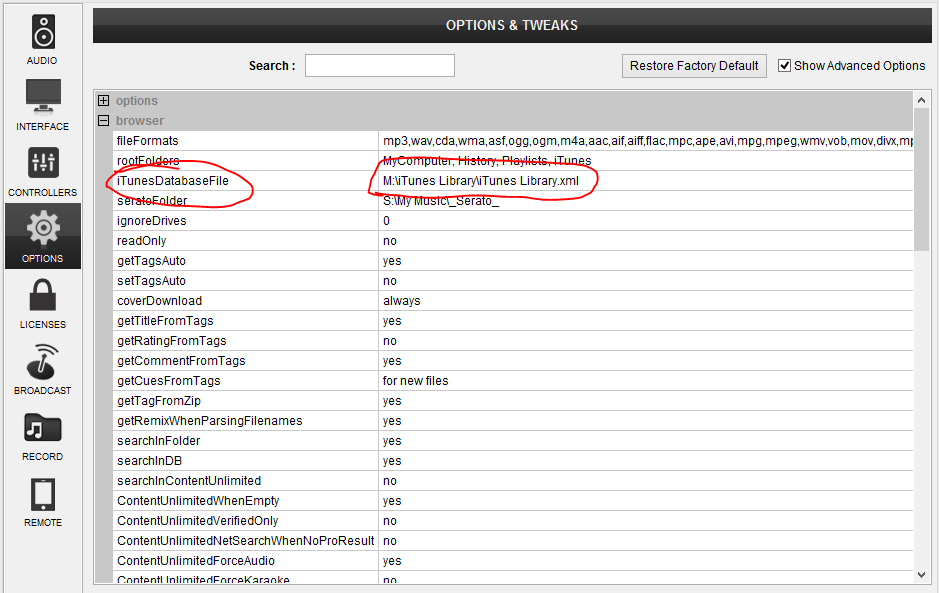
    Have you set the iTunes database file path in VDJ?

    If you haven’t, try going to Settings -> Options (Make sure “Show advanced options is ticked top right) -> Browser as shown below. Check the File path actually points to your iTunes library..

    #2202301
    Tim Vandamme
    Participant

    it does..

    #2202311
    Tim Vandamme
    Participant

    i see everything, everything seems to be ok
    but error while loading

Viewing 15 posts - 1 through 15 (of 15 total)
  • The forum ‘DJing Software’ is closed to new topics and replies.