
traktor 2.7.3 snap crackle pop
Learn To DJ With Digital DJ Tips › Forums › DJing Software › traktor 2.7.3 snap crackle pop
- This topic has 17 replies, 5 voices, and was last updated 11 years, 7 months ago by
DJ Vintage.
-
AuthorPosts
-
February 24, 2015 at 9:54 pm #2146641
bob6397
ParticipantIncrease buffer size in audio settings??
Re-install sound card drivers (if you remembered to install them in the first place 🙂 )
bob6397
February 24, 2015 at 9:58 pm #2146651Participantbuffer size = latency in traktor settings 🙂
Also check that it isn’t set as the default windows playback device. If it is change that to the built in soundcard, then restart all running programs. This can cause sample rate issues as chrome/IE/firefox/iTunes run your soundcard at 44.1kHz but traktor will want to run at 48kHz or 96kHz – this can cause crackling.
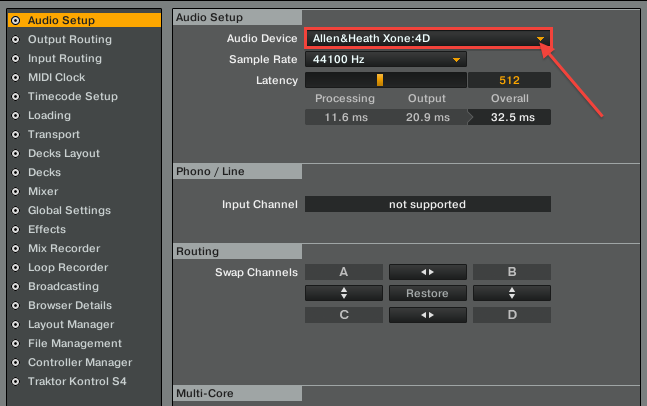
^Ignore the arrow – Just pointing out the settings page. Make sure the latency is at least 512, then decrease until it starts crackling again. This will fins the lowest level it can be on your system (lower = less time delay through soundcard)
February 24, 2015 at 10:07 pm #2146671Stazbumpa
ParticipantAt the risk of sounding stupid………..
If you’re on a Windows laptop try switching off EVERYTHING that is not essential to Traktor.
ACPI-Compliant Control Method Battery
CD/DVD RW
Wireless and Bluetooth
Webcam
On board sound cardAlso look at your background tasks and “end process” on anything unnecessary.
February 24, 2015 at 10:16 pm #2146681Mat
ParticipantMy laptop ran fine before. You can’t change latency when its running through laptop speakers……
Same for the soundcard drivers.(Which I have done)
Everything was turned off
traktor worked fine on 2.6.8 which was the last time I updated.February 24, 2015 at 10:20 pm #2146691ParticipantThabks for the help but I know about latency etv, I’ve used traktor for about 5 years..
my laptop has an amd a8, 8gb ram.As I said was running fine. But had to much music all over the place hence why I wiped it.
so I had to have 2.7.3 version which has caused problems.
February 25, 2015 at 9:35 pm #2147331ParticipantWhat OS are you running? Are you on an older version of Windows/OSX (You still havent said which – that could really help here as problems are different on different systems..) ???
Why can’t you change the latency when going through the laptop speakers?? I can.. (I am on VDJ8 though so it’s a bit different….)
February 25, 2015 at 11:29 pm #2147371ParticipantWindows 8.1 which was previously. I don’t know why but it sets itself when going through laptop speakers.
I used traktor dj last night so I know the sound card audio 6 is fine. So it can only be the current version of traktor
February 26, 2015 at 6:48 pm #2147621ParticipantIs it just the laptop speakers that are crackling or does the Audio 6 crackle too?
February 27, 2015 at 9:14 am #2147961ParticipantIt’s both, when Using laptop at home playing music through traktor/laptop speakers it pops and crackles. ITunes, ableton. Doesn’t.
In the club with audio 6 using traktor is crackles and pops. Only using traktor.
Traktor dj app and ableton is fine with the audio 6 so I know the audio 6 is fine.
February 27, 2015 at 11:36 am #2148011DJ Vintage
ModeratorI am still going with a driver and/or setting (most likely latency) problem.
February 27, 2015 at 12:37 pm #2148051ParticipantBut you can’t change latency on traktor when it runs through the laptop speakers, only when the sound card is connect, when you can change latency.
I’ve updated the drivers are reinstalled them numerous times. But it’s still the same,
2.6.8 worked fine with no problems.
thanks
February 27, 2015 at 2:38 pm #2148181Dan M
ParticipantMat, I’ve had the exact same problem and it seems that a lot of users have had this issue with 2.7.3. I’ve found that if you zoom into the waveform at the points where the sound issues are, it can be seen that there are audio gaps and omissions repeatedly in the track. Therefore it is not a sound card issue, but in fact an issue with the software. When I’ve reverted back to using 2.6.8 there is no longer such issues with the audio. Therefore it seems to be an issue with 2.7.3. I’m waiting on a reply from the Native Instruments support team with regards to this problem but if it’s simply a glitch in the software hopefully it will be fixed soon with an update. This guy shows the problem, where it seems to be a bit more extreme in his case: https://www.youtube.com/watch?v=up7cXUOYNok
February 27, 2015 at 5:20 pm #2148271ParticipantThank god of it’s not me going mad….
is there a way to go back to 2.6.8 even though I wiped my laptop ?
Thanks
February 27, 2015 at 7:29 pm #2148331ParticipantIf you go to native instruments personal update manager and login.
You can download a previous version or traktor. So I’ve gone back to 2.6.8
February 28, 2015 at 8:36 am #2148501ModeratorSo much for pro DJ software 😀
-
AuthorPosts
- The forum ‘DJing Software’ is closed to new topics and replies.