
Help with a new laptop
Learn To DJ With Digital DJ Tips › Forums › The DJ Booth › Help with a new laptop
- This topic has 14 replies, 1 voice, and was last updated 14 years, 1 month ago by
djskyward.
-
AuthorPosts
-
August 13, 2012 at 7:50 pm #1009657
twicx
MemberThe first one is probably the best tbh. I was going to write a big tl;dr thing on how to keep your windows pc in tip-top shape (my second laptop is 6 years old, no firewall, antivirus etc, and it’s as fast as day 1, simple upkeep) but I’d be here all day.
try pcspecialist.co.uk . I’ve gotten a laptop from them, as has my bro, and they’re both phenomenal.
August 13, 2012 at 7:51 pm #1009658Hee Won Jung
ParticipantThe Laptop you have is more than capable for DJing.
The Best thing to do is reformat it and dont use it for anything else except DJing and you shouldnt have a problem
The issue with Cracks and pops can be a multitude of reasons and will just be a matter of trouble shooting the problem drivers.
The best thing to do is use LatencyMon and find what drivers are causing the errors and fix them.
My current Laptop an Alienware M15x had massive dropouts/clicks and it was just a matter of fixing them.
I also have my Backup DJ laptop which is a 4 year old toshiba that i bought for 200.00 bucks and it still works perfectly…but is not powerful enough for me to run both my Vjing program and my DJing program in sync so thus i had to upgrade…but for just regular djing and really cheap laptop will do the trick.
August 13, 2012 at 9:16 pm #1009667djskyward
MemberThanks for your replies! As I use my laptop a lot for web surfing etc and now that I have work, I think it would be ideal to have a dedicated laptop, but now that I know I don’t need to spend a fortune on a high-end one to run DJ software then that’s given me piece of mind.
Thanks
August 14, 2012 at 6:57 am #1009682Viking Persson
MemberHi!
The best solution for you probably is to partition your hard drive and have two different Windows installations. One work/home installation and one DJ installation. The DJ installation should only have necessary drivers installed and all unnecessary devices such as WiFi, Bluetooth, internal sound card etc disabled. The only software to install should be your DJ software.
Use this guide: http://www.native-instruments.com/knowledge/questions/847/Windows+7+Tuning+Tips+for+Audio+Processing
If you do this right you should have now problems what so ever playing with that laptop. I even use my 11.6″ mini PC with AMD E-350 CPU with my S4 sometimes.
August 14, 2012 at 7:16 am #1009684Terry_42
KeymasterI agree. Now I am a Mac User, but just for reference towards “power needed”. I DJ most of the time on a 15” MacBook Pro with a 2.2 GHz Core2Duo from I think 2008… So I guess the same is OK with Windows. You do not need a top of the line machine.
Some of my buddies do great with their Dell’s as they seem to have a pretty good warranty package with pickup service, that I would recommend. You earn money with that thing, so buy at least 3 years warranty with pickup service.August 14, 2012 at 9:19 am #1009689MemberViking nailed it. Just do that with your current one imo. Buy a bigger hard drive if you need it.
August 14, 2012 at 6:59 pm #1009708MemberHi all, thanks for your replies.
Massive change of mind over here! I have purchased myself a Macbook!
So here’s the story;
It was a mistake, there’s no denying that. Basically, I didn’t have enough credit to purchase a mac so I thought “well I’ve already tried to purchase a MBP just for the hell of it so let’s try an MBA instead” …And oops..it got accepted.
It’s due to be delivered tomorrow, however I am not sure whether to refuse delivery and wait a further 2 weeks for the credit to be credited back into my account just so I can purchase a MBP.
Here are the specs for the Air:
[FONT=inherit][SIZE=12px][FONT=inherit][FONT=inherit][FONT=inherit]
- [FONT=inherit]1.6GHz dual core Intel Core i5 processor
- 4Gb RAM
- 128Gb flash storage
- 11.6″ high-resolution LED-backlit glossy widescreen display
- Intel HD Graphics 3000 processor
- FaceTime camera
- 2x USB 2.0 ports
- Thunderbolt port
- 802.11n Wi-Fi ; 5 IEEE 802.11a/b/g compatible
- Bluetooth 4.0
- Software includes – OS X Lion, Lion Recovery and iLife
- Apple MacBook Air notebook MC969B/A
I like that it has a SSD (unbeatable) but I’m not so sure how I feel about working on an 11″ screen when I am used to 15″. However I only use a laptop to load my tracks up, I use a mixer the rest of the time.
It’s ultra-portible when I take into account all the other gear I carry around but I just don’t know..
It’s £150 cheaper than the pro and considering the pro has the same specs..with the exception of a faster gHz rate of 2.5 (Does this make a huge difference?)
I’m not too worried about the lack of HDD memory as an external HDD will do just find and I barely have 25GB of music anyway.
So I’d like your opinion as to whether I accept the delivery or not? My friend told me, if I don’t like it, sell it and get a pro which is always an option.
I run Serato/Traktor and apparently it runs like a dream on the new model MBA, so what are your views?
Thanks[/FONT][/FONT][/FONT][/FONT][/SIZE][/FONT]August 14, 2012 at 10:01 pm #1009715Nicko D.
MemberInitially I didn’t reply to your post because you said “no Macs” but I have the exact setup you are about to have.
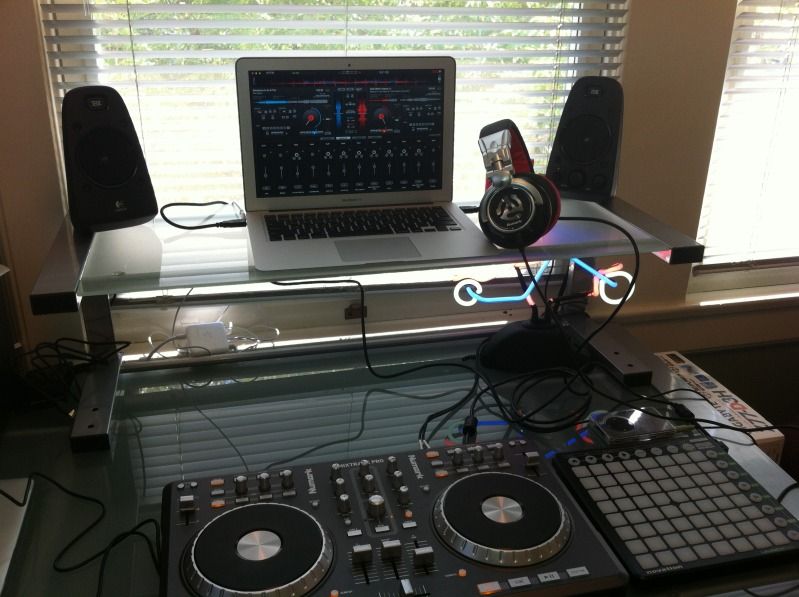
Here’s what I’ve learned working with the MBA:
The SSD kicks ass and takes names. I will never ever go back to a regular hard drive. Even if it completely crashes it can be back up and running in less than ten seconds.
It gets hot so understand that since you don’t have massive vents (it’s ultra portable) you will need to keep it cool. Since that picture I have a tray full of fans that plugs into a USB port for power and goes right under the laptop to keep it cool.
It’s fully covered, even without Apple Care, for the first year. See my post about my fried logic board in the forums and my zero bill happiness.
You can truly control everything that’s starting up (or not starting up) with your profile. From the basic screen savers to the midi control panels Lion and now Mountain Lion are amazing on giving you complete control.
I think you will find that you not part with your MBA for a long long time. 🙂
August 14, 2012 at 10:17 pm #1009716MemberNicko D., post: 25906, member: 2782 wrote: Initially I didn’t reply to your post because you said “no Macs” but I have the exact setup you are about to have.
Here’s what I’ve learned working with the MBA:
The SSD kicks ass and takes names. I will never ever go back to a regular hard drive. Even if it completely crashes it can be back up and running in less than ten seconds.
It gets hot so understand that since you don’t have massive vents (it’s ultra portable) you will need to keep it cool. Since that picture I have a tray full of fans that plugs into a USB port for power and goes right under the laptop to keep it cool.
It’s fully covered, even without Apple Care, for the first year. See my post about my fried logic board in the forums and my zero bill happiness.
You can truly control everything that’s starting up (or not starting up) with your profile. From the basic screen savers to the midi control panels Lion and now Mountain Lion are amazing on giving you complete control.
I think you will find that you not part with your MBA for a long long time. 🙂
Thanks for your reply, I currently have a laptop stand which is raised so was just wondering if that will keep it cool enough?
August 14, 2012 at 11:29 pm #1009718MemberMine as you can see is raised as well but it’s not enough. I am in Sacramento where we currently enjoy toasty 116 F days and with the AC and a fan blowing towards my man cave the laptop still gets hot after a three hour set (the length of my radio show broadcast). So I very highly suggest the cooling pad.
August 15, 2012 at 12:44 am #1009724MemberNicko D., post: 25909, member: 2782 wrote: Mine as you can see is raised as well but it’s not enough. I am in Sacramento where we currently enjoy toasty 116 F days and with the AC and a fan blowing towards my man cave the laptop still gets hot after a three hour set (the length of my radio show broadcast). So I very highly suggest the cooling pad.
Thankyou. I think I will accept the delivery tomorrow and see how it all runs when set-up. I’ll put it under a stress test.
As a friend told me, I should accept it and if I don’t like it, I could sell it for a near enough ‘new’ price and get a pro but fingers crossed it runs flawlessly!
So sick of my HP locking-up on me 3-4 times a gig!
August 15, 2012 at 12:57 am #1009725MemberLooking forward to hearing your feedback after you have a few days with your new MBA! 🙂
August 15, 2012 at 7:15 am #1009729MemberMind you, that’s last years model of the Air. I hope you got a good discount.
About the size, I played allot with my 11.6″ and I always felt it was too small. I finally received my 13.3″ Air @ 1440×900 yesterday and it’s just the right size.
August 16, 2012 at 8:30 pm #1009810MemberHi all, my MBA is with me and all set up!
Found out they’d delivered an 11 inch, i7 duo core, 4gb RAM and 256GB SSD to my door instead of the model I had actually ordered which had a i5 duo core processor and 128gb SSD..so it seems I paid no more for this spec! Hope I don’t get a call from Very telling me they’d delivered me the wrong model..
All my tracks, photos and videos have been migrated with still 190GB to spare!
I’ve decided to run VDJ Pro 7 instead of Serato/Traktor as I just prefer it! Anyone know how well it works with MBA’s? Any glitches, freezes, lock-ups etc??
Thanks.
-
AuthorPosts
- The forum ‘The DJ Booth’ is closed to new topics and replies.